


ORB‑Mod
Update to the ORB MOD study I included with a shared chart over the weekend.
This version adds a small UI refinement for extended‑hours charts.
Specifically:
the ORB label auto‑disables whenever ORB = N/A during extended hours.
I was watching /GC on the 2‑minute yesterday evening and the N/A % label was annoying enough that it deserved a fix.
This update keeps ORB fully functional on 15‑minute and lower charts across all instruments, while preventing overnight clutter on futures or when using extended hours.
General Description
The heart of this study comes directly from @csricksdds AGAIG Best Trading Chart Setup charts.
I added an ORB % readout because I like having a quick visual reference for the size of the opening range.
If ORB is roughly 5%, I’ll often play from below → into the ORB.
The percentage gives me a clean, at‑a‑glance sense of whether the range is tradable or too tight.
Examples
SRTY was the ORB play today
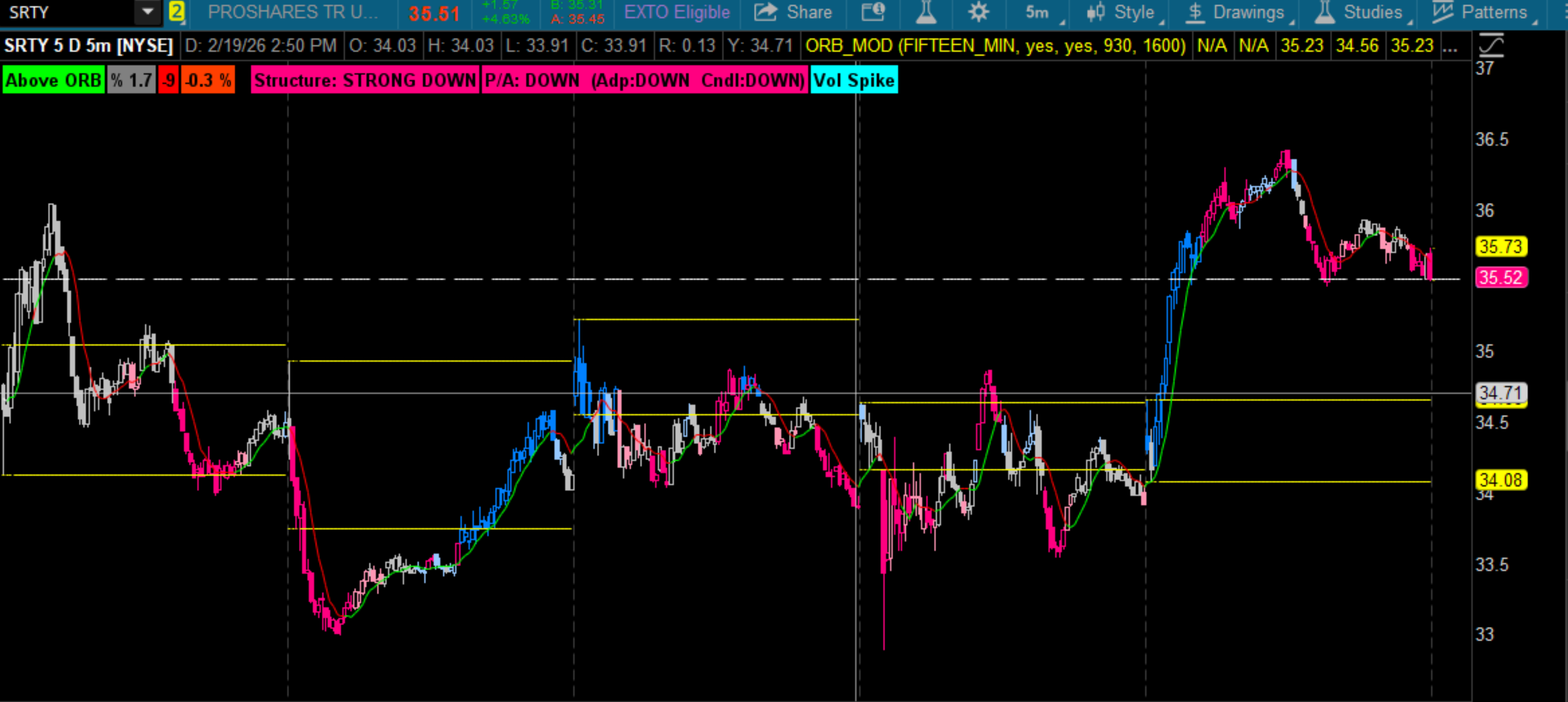
Clean break, clean structure, and the ORB % made the setup obvious.
NUGT had a nice run out of the chute but played out by 8:44
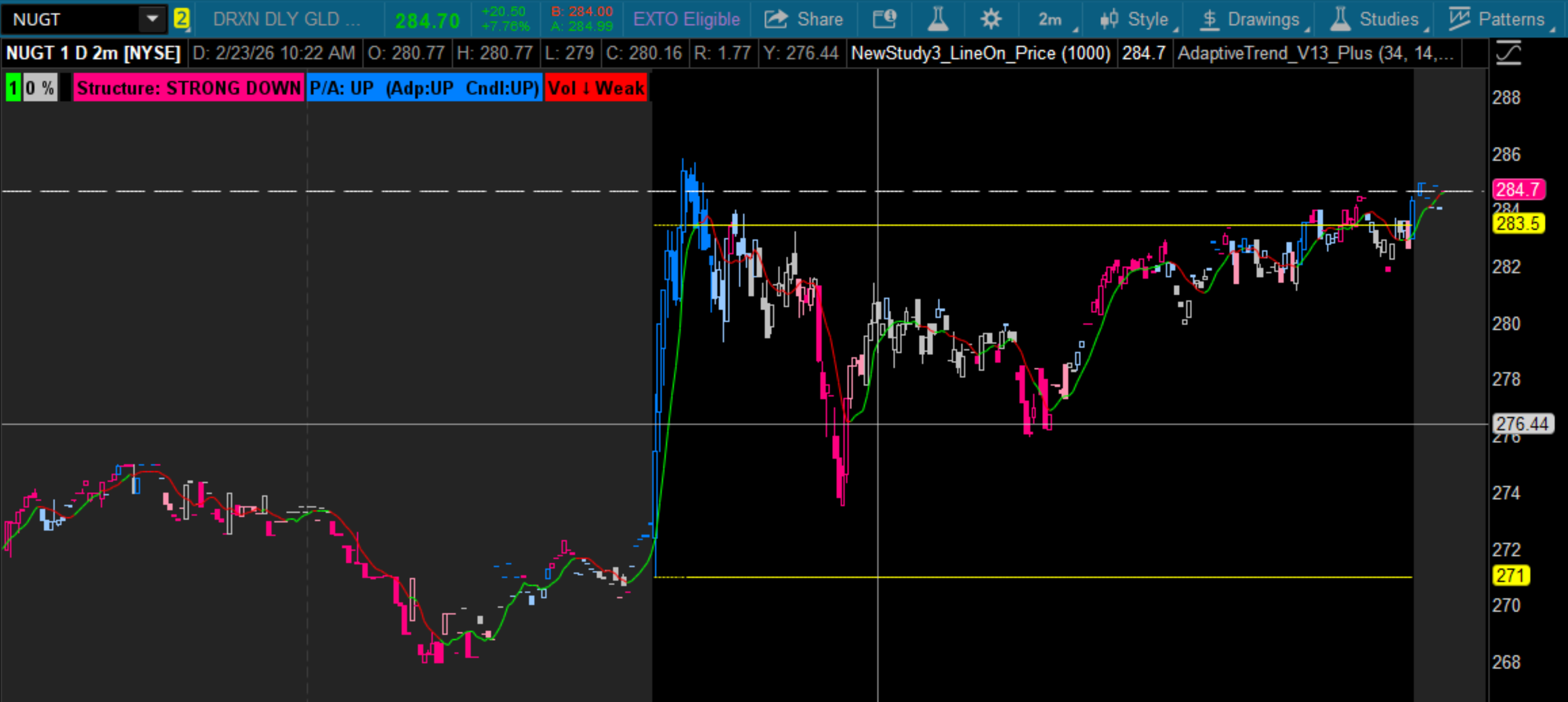
Classic early‑session burst, then done.
The updated ORB label logic keeps the overnight session clean.
References
For trading ORB, please refer to:
Both are excellent resources if you want to understand the original logic and philosophy behind the ORB approach.
Personal note: I scalp a small, defined group of leveraged‑with‑inverse ETF pairs, but the ORB_Mod study is universal.
Code:
Update to the ORB MOD study I included with a shared chart over the weekend.
This version adds a small UI refinement for extended‑hours charts.
Specifically:
the ORB label auto‑disables whenever ORB = N/A during extended hours.
I was watching /GC on the 2‑minute yesterday evening and the N/A % label was annoying enough that it deserved a fix.
This update keeps ORB fully functional on 15‑minute and lower charts across all instruments, while preventing overnight clutter on futures or when using extended hours.
General Description
The heart of this study comes directly from @csricksdds AGAIG Best Trading Chart Setup charts.
I added an ORB % readout because I like having a quick visual reference for the size of the opening range.
If ORB is roughly 5%, I’ll often play from below → into the ORB.
The percentage gives me a clean, at‑a‑glance sense of whether the range is tradable or too tight.
Examples
SRTY was the ORB play today
Clean break, clean structure, and the ORB % made the setup obvious.
NUGT had a nice run out of the chute but played out by 8:44
Classic early‑session burst, then done.
The updated ORB label logic keeps the overnight session clean.
References
For trading ORB, please refer to:
Both are excellent resources if you want to understand the original logic and philosophy behind the ORB approach.
Personal note: I scalp a small, defined group of leveraged‑with‑inverse ETF pairs, but the ORB_Mod study is universal.
Code:
Ruby:
#orb_colors_03
#Mobius original
#csricksdds  2/20
#I like your ORB indicator with the labels that show when above/below...so that the labels don't show only when above/below can you add one showing Yellow "Trading within ORB" when it's trading within?
#Thanks to halcyonguy I have made a few changes to suit myself.
#https://usethinkscript.com/threads/shaded-opening-range-no-breakout.17922/
#Shaded Opening Range (No Breakout)
# 2020-01
# halcyonguy
#Revamped by C. Ricks 2/12/24
#Mod atcsam:added ORB %, label trap using extended hours

def na = Double.NaN;

# pick an agg time
input orb_time = AggregationPeriod.fifteen_min;
def orb_min = orb_time/60000;
def per = orb_min;

input show_ORB_label = yes;
input show_arrows = yes;

# open/close times  (ET)
input start = 0930;
input end = 1600;
def daytime = if secondsfromTime(start) >= 0 and secondstillTime(end) > 0 then 1 else 0;

def getgg = getaggregationPeriod();
def getaggmin = round(getgg/60,0);

addlabel(0,getaggmin);

# test if agg time is > than chart time
def aggok = if getaggmin <= orb_min then 1 else 0;


def durationsec = per * 60;
def secondspassed = secondsfromTime(start);
#  simulated firstbar , based on orb time
def firstbar = if secondspassed >= 0 and secondspassed < durationsec then 1 else 0;
#addchartbubble(yes,low,per + "__" + firstbar + "__" + agg);
def afterfirst = if ( daytime and !firstbar ) then 1 else 0;

# is this the first bar after open ?
def openbar = if secondspassed >= 0 and secondspassed <= getgg then 1 else 0;

def ehi = high(period = orb_time);
def elo = low(period = orb_time);

#  looks at firstbar ,  which is orbtime ,  NOT bar[1]
def perhigh = if !daytime then na else if firstbar then ehi else perhigh[1];
def perlow = if !daytime then na else if firstbar then elo else perlow[1];

# .....................................................
def orbValid = daytime and !IsNaN(perhigh) and !IsNaN(perlow);

addlabel(orbValid and close > perhigh, "Above ORB", color.green);
addlabel(orbValid and close < perlow, "Below ORB", color.red);
addlabel(orbValid and close <= perhigh and close >= perlow, "Inside ORB", color.yellow);

addlabel(orbValid, "% " + Round(((perhigh - perlow)/perlow)*100,2), color.gray);

#addlabel(1, " ", color.Yellow);
#addlabel((close > perhigh),"Above ORB", color.green);
#addlabel((close < perlow),"Below ORB", color.red);
#addlabel((close <= perhigh and close >= perlow),"Inside ORB", color.yellow);
#addlabel(1, " ", color.Yellow);
#addlabel (1,"% " + Round(((perhigh - perlow)/perlow)*100,2)
#, color.gray);

#addlabel(1, " ", color.BLACK);

# .....................................................

# plot dots for first bar timeframe
plot hidots = if firstbar then perhigh else na;
plot lodots = if firstbar then perlow else na;
hidots.setpaintingStrategy(paintingStrategy.Dashes);
lodots.setpaintingStrategy(paintingStrategy.Dashes);
hidots.setDefaultColor(color.yellow);
lodots.setDefaultColor(color.yellow);


# plot line after first bar
plot hiline = if !firstbar then perhigh else na;
plot loline = if !firstbar then perlow else na;
hiline.setpaintingStrategy(paintingStrategy.LINE);
loline.setpaintingStrategy(paintingStrategy.LINE);
hiline.setDefaultColor(color.yellow);
loline.setDefaultColor(color.yellow);

#DefineGlobalColor("orb",color.magenta);
#DefineGlobalColor("orb_after",color.gray);
DefineGlobalColor("orb",color.red);
DefineGlobalColor("orb_after",color.green);

plot static = hiline;
static.AssignValueColor(Color.Yellow);

def limit = !IsNaN(close) and IsNaN(close [-1] ) && LowestAll(BarNumber());

#AddChartBubble(limit, static, "ORB HI", Color.Yellow);


plot static2 = loline;
static2.AssignValueColor(Color.Yellow);

def limit2 = !IsNaN(close) and IsNaN(close [-1] ) && LowestAll(BarNumber());

#AddChartBubble(limit2, static2, "ORB LO", Color.YELLOW);

