

MTF Velocity and Acceleration
This study measures market momentum using two derived metrics:
1) Velocity — the rate of price change
2) Acceleration — the rate of change of velocity
Together, they provide insight into both trend strength (velocity) and
whether that trend is strengthening or weakening (acceleration). This
helps identify early momentum shifts, continuation conditions, and
potential reversals.
Implementation:
- Velocity is calculated as a weighted average of price differences over
a lookback period (length), giving more influence to recent price changes.
- Velocity is then smoothed using a selectable moving average
(default: exponential).
- Acceleration is calculated as a weighted average of changes in the
smoothed velocity (second derivative of price).
- Both values are scaled for visual clarity.
- Multi-Timeframe (MTF) support allows calculations to be performed on a
higher aggregation period than the chart, improving signal stability.
- Adaptive inputs automatically adjust key parameters (length and
smoothing) based on:
• Chart timeframe (faster settings for lower timeframes)
• Futures symbols (/ES, /NQ, /CL, /RTY, /GC and micros)
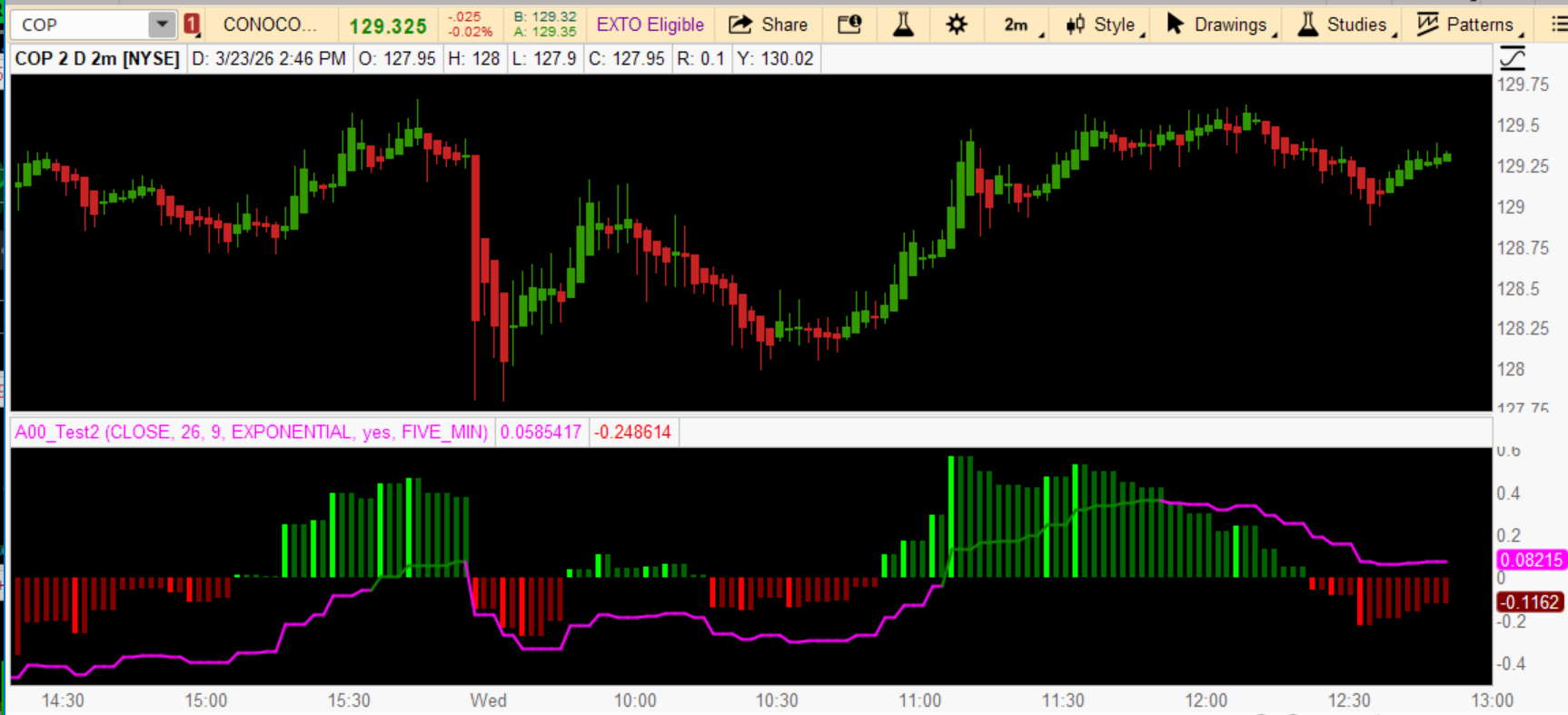
- Visualization:
• Velocity plotted as a line
• Acceleration plotted as a histogram with directional coloring
• Velocity turns magenta when it exceeds acceleration above zero
or falls below acceleration below zero, highlighting momentum divergence
Result:
A momentum framework that combines trend speed and change-of-speed,
offering a more complete view than traditional single-indicator methods.
This study measures market momentum using two derived metrics:
1) Velocity — the rate of price change
2) Acceleration — the rate of change of velocity
Together, they provide insight into both trend strength (velocity) and
whether that trend is strengthening or weakening (acceleration). This
helps identify early momentum shifts, continuation conditions, and
potential reversals.
Implementation:
- Velocity is calculated as a weighted average of price differences over
a lookback period (length), giving more influence to recent price changes.
- Velocity is then smoothed using a selectable moving average
(default: exponential).
- Acceleration is calculated as a weighted average of changes in the
smoothed velocity (second derivative of price).
- Both values are scaled for visual clarity.
- Multi-Timeframe (MTF) support allows calculations to be performed on a
higher aggregation period than the chart, improving signal stability.
- Adaptive inputs automatically adjust key parameters (length and
smoothing) based on:
• Chart timeframe (faster settings for lower timeframes)
• Futures symbols (/ES, /NQ, /CL, /RTY, /GC and micros)
- Visualization:
• Velocity plotted as a line
• Acceleration plotted as a histogram with directional coloring
• Velocity turns magenta when it exceeds acceleration above zero
or falls below acceleration below zero, highlighting momentum divergence
Result:
A momentum framework that combines trend speed and change-of-speed,
offering a more complete view than traditional single-indicator methods.
Code:
# =====================================================================
# VELOCITY & ACCELERATION (MTF + ADAPTIVE INPUTS)
# =====================================================================
# Author: Custom Build
# Version: 1.0
# Last Update: 2026-03-23
#
# DESCRIPTION:
# This study computes smoothed Velocity and Acceleration of price using
# a weighted differential approach. Velocity represents the rate of
# price change, while Acceleration represents the rate of change of
# Velocity (second derivative).
#
# The script supports Multi-Timeframe (MTF) operation and dynamically
# adjusts key parameters based on the active chart symbol and timeframe
# for major futures instruments.
#
# ---------------------------------------------------------------------
# CORE COMPONENTS:
# - Velocity:
#     Weighted average of price change over 'length'
# - Acceleration:
#     Weighted average of change in smoothed velocity
# - Smoothing:
#     Configurable moving average (default: EMA)
#
# ---------------------------------------------------------------------
# MULTI-TIMEFRAME (MTF):
# - When enabled, calculations use selected aggregation period
# - Price series sourced via:
#     high(period = p), low(period = p), close(period = p), open(period = p)
#
# ---------------------------------------------------------------------
# ADAPTIVE INPUT LOGIC:
# Automatically adjusts parameters for:
#   /ES, /MES  (S&P 500 Futures)
#   /NQ, /MNQ  (Nasdaq Futures)
#   /CL, /MCL  (Crude Oil)
#   /RTY, /M2K (Russell 2000)
#   /GC, /MG   (Gold)
#
# Behavior:
# - Lower timeframes → shorter length, faster response
# - Higher timeframes → longer length, smoother output
# - All other symbols use default inputs
#
# ---------------------------------------------------------------------
# OUTPUTS:
# - Velocity (line)
# - Acceleration (histogram with directional coloring)
#
# Acceleration Color States:
# - Green       → Positive & Increasing
# - Dark Green  → Positive & Decreasing
# - Red         → Negative & Decreasing
# - Dark Red    → Negative & Increasing
#
# ---------------------------------------------------------------------
# DESIGN NOTES:
# - Fold-based calculations ensure deterministic behavior
# - No recursive dependencies
# - Safe for MTF aggregation usage
# - Fully compile-time compliant with template v1.9
#
# ---------------------------------------------------------------------
# LIMITATIONS:
# - Early bars (< length) may have reduced accuracy
# - MTF aggregation may introduce visual lag vs. native timeframe
#
# ---------------------------------------------------------------------
# END HEADER
# =====================================================================

declare lower;

# -----------------------------
# Default Inputs
# -----------------------------
input defaultPriceSource = close;
input defaultLength = 26;
input defaultAverageLength = 9;
input defaultAverageType = AverageType.EXPONENTIAL;

input MTF = yes;
input MTF_timeframe = AggregationPeriod.FIVE_MIN;

# -----------------------------
# Chart timeframe
# -----------------------------
def tf = GetAggregationPeriod();

# -----------------------------
# Dynamic Inputs by Symbol & TF
# -----------------------------
def length = if GetSymbol() == "/ES" or GetSymbol() == "/MES" then
                 if tf <= AggregationPeriod.FIVE_MIN then 20
                 else if tf <= AggregationPeriod.FIFTEEN_MIN then 26
                 else 34
             else if GetSymbol() == "/NQ" or GetSymbol() == "/MNQ" then
                 if tf <= AggregationPeriod.FIVE_MIN then 20
                 else 26
             else if GetSymbol() == "/CL" or GetSymbol() == "/MCL" then
                 if tf <= AggregationPeriod.FIVE_MIN then 18
                 else 26
             else if GetSymbol() == "/RTY" or GetSymbol() == "/M2K" then
                 if tf <= AggregationPeriod.FIVE_MIN then 20
                 else 26
             else if GetSymbol() == "/GC" or GetSymbol() == "/MG" then
                 if tf <= AggregationPeriod.FIVE_MIN then 18
                 else 26
             else defaultLength;

def averageLength = if GetSymbol() == "/ES" or GetSymbol() == "/MES" then
                        if tf <= AggregationPeriod.FIVE_MIN then 5
                        else 9
                    else if GetSymbol() == "/NQ" or GetSymbol() == "/MNQ" then
                        if tf <= AggregationPeriod.FIVE_MIN then 5
                        else 9
                    else defaultAverageLength;

def averageType = defaultAverageType;

# -----------------------------
# MTF Price Series
# -----------------------------
def p = if MTF then MTF_timeframe else tf;
#def priceH = high(period = p);
#def priceL = low(period = p);
def priceC = close(period = p);
#def priceO = open(period = p);
def price = priceC;

# -----------------------------
# Velocity Calculation
# -----------------------------
def avgVelocity = (fold i = 1 to length + 1 with vel
                   do vel + (price - price[i]) / i) / length;

def smoothedAvgVelocity = MovingAverage(averageType, avgVelocity, averageLength);

# -----------------------------
# Acceleration Calculation
# -----------------------------
def avgAcceleration = (fold j = 1 to length + 1 with acc
                       do acc + (smoothedAvgVelocity - smoothedAvgVelocity[j]) / j) / length;

# -----------------------------
# Plots
# -----------------------------
plot Velocity = 100 * smoothedAvgVelocity / length * 2;
plot Acceleration = 100 * avgAcceleration;

# -----------------------------
# Velocity Styling (UPDATED)
# -----------------------------
Velocity.SetLineWeight(2);
Velocity.AssignValueColor(
    if Velocity > 0 and Velocity > Acceleration then Color.MAGENTA
    else if Velocity < 0 and Velocity < Acceleration then Color.MAGENTA
    else GetColor(1)
);

# -----------------------------
# Acceleration Styling
# -----------------------------
Acceleration.SetDefaultColor(GetColor(5));
Acceleration.SetPaintingStrategy(PaintingStrategy.HISTOGRAM);
Acceleration.SetLineWeight(3);

Acceleration.DefineColor("Positive and Up", Color.GREEN);
Acceleration.DefineColor("Positive and Down", Color.DARK_GREEN);
Acceleration.DefineColor("Negative and Down", Color.RED);
Acceleration.DefineColor("Negative and Up", Color.DARK_RED);

Acceleration.AssignValueColor(
    if Acceleration >= 0 then
        if Acceleration > Acceleration[1] then Acceleration.Color("Positive and Up")
        else Acceleration.Color("Positive and Down")
    else
        if Acceleration < Acceleration[1] then Acceleration.Color("Negative and Down")
        else Acceleration.Color("Negative and Up")
);
Attachments
Last edited:


