

Laguerre-Smoothed, Integrated-Regression Trend Analysis - (aka "The LASIR")
The LaSIR (Laguerre Smoothed Integrated Regression), is a sophisticated trend-following indicator. It moves away from simple price action and instead measures the accumulated energy (the "area") between two smoothed regression lines.
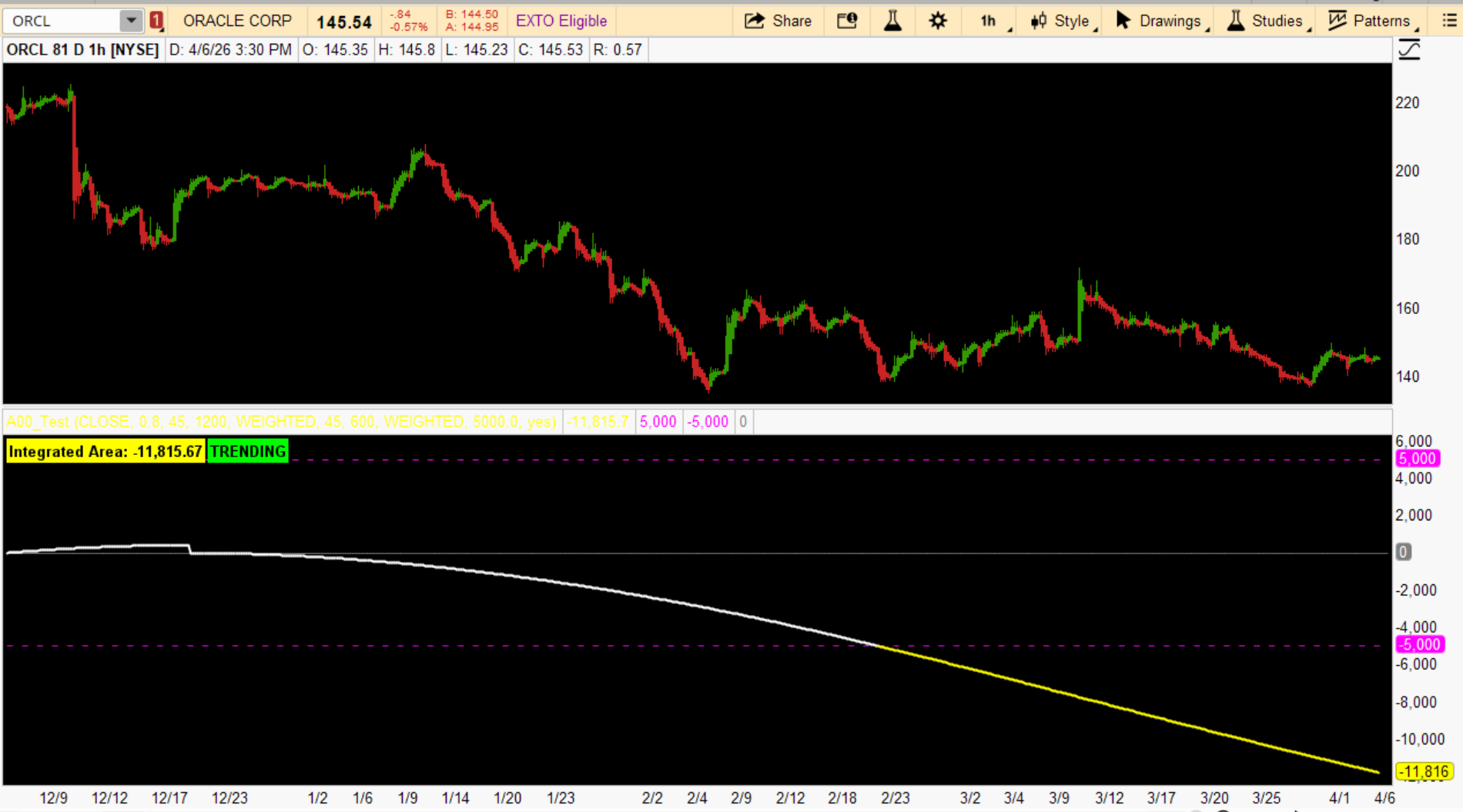
Here is a breakdown of how the engine functions and what it signals.
1. The Core Components
The Laguerre Filter (The "Noise Canceller")
Before any math happens, the code applies a 4-pole Laguerre filter.
The study calculates two lines (Slow and Fast) using a specific sequence:
This is the most unique part of the study. Instead of just looking at the FastLine crossing the SlowLine, it calculates the cumulative sum of the spread between them.
2. Trend Classification
The indicator categorizes the market into three states based on the AreaThreshold (default 5000):
3. Key Observations & Strategy Notes
The LaSIR is best used as a directional filter. If the Area is Cyan, you only look for long entries on lower-timeframe pullbacks. If it’s White, you expect "Chop" and might avoid trend-following strategies altogether until a threshold is breached.
The LaSIR (Laguerre Smoothed Integrated Regression), is a sophisticated trend-following indicator. It moves away from simple price action and instead measures the accumulated energy (the "area") between two smoothed regression lines.
Here is a breakdown of how the engine functions and what it signals.
1. The Core Components
The Laguerre Filter (The "Noise Canceller")
Before any math happens, the code applies a 4-pole Laguerre filter.
- Purpose: Unlike a simple moving average, Laguerre filters are designed to provide high smoothing with very low lag.
- The Gamma Factor: At the default 0.8, the script heavily filters out "market noise" to focus on the underlying price cycle.
The study calculates two lines (Slow and Fast) using a specific sequence:
- Log Transformation: It takes the natural log of the price to normalize percentage moves.
- Linear Regression (Inertia): It finds the "line of best fit" for the price over 45 periods.
- Exp Reversion: It converts the log values back to standard price units.
- Moving Average Smoothing: It applies a massive Weighted Moving Average (600 and 1200 periods) to the result.
This is the most unique part of the study. Instead of just looking at the FastLine crossing the SlowLine, it calculates the cumulative sum of the spread between them.
- Every bar where the Fast line is above the Slow line adds to the "Area."
- Every bar below subtracts from it.
- The Reset: The "engine" resets its calculation only when a crossover occurs.
2. Trend Classification
The indicator categorizes the market into three states based on the AreaThreshold (default 5000):
| State | Condition | Visual Color | Interpretation |
| Bullish Trend | Area > 5000 | Cyan | Significant momentum has "built up" to the upside. |
| Bearish Trend | Area < -5000 | Yellow | Heavy cumulative pressure to the downside. |
| Consolidation | Between -5000 / 5000 | White | The market lacks sufficient "integrated" momentum to confirm a trend. |
3. Key Observations & Strategy Notes
- Extreme Smoothing: With moving average lengths of 600 and 1200, this is a macro-trend tool. It is not designed for day trading or scalping; it is built to identify major regime shifts over weeks or months.
- Momentum "Memory": Because it uses an areaInt (integrated area), the indicator has "memory." A small crossover won't immediately turn the trend Cyan or Yellow; the price must stay on one side of the regression long enough to "fill the tank" and cross the 5000 threshold.
- The Zero-Line: The ZeroLine acts as the pivot. If the AreaPlot is moving toward zero, it suggests the current trend is exhausting, even if the label still says "TRENDING."
The LaSIR is best used as a directional filter. If the Area is Cyan, you only look for long entries on lower-timeframe pullbacks. If it’s White, you expect "Chop" and might avoid trend-following strategies altogether until a threshold is breached.
Code:
# --- LAGUERRE SMOOTHED INTEGRATTED REGRESSION TREND ENGINE AKA THE LaSIR ---
# by whoDAT
# 4/2026

declare lower;

# --- INPUTS ---
input price = close;                  # <--- Dropdown: close, high, low, hl2, hlc3, ohlc4, open, etc.
#hint price: Select the base price type (raw price) to smooth with Laguerre

input gamma = 0.8;                   # Laguerre damping factor (0.2 = very responsive, 0.8 = smoother)
#hint gamma: Laguerre filter smoothing (lower = faster response, higher = smoother)

input regLength_Slow = 45;
input maLen_Slow = 1200;
input maType_Slow = AverageType.WEIGHTED;

input regLength_Fast = 45;
input maLen_Fast = 600;
input maType_Fast = AverageType.WEIGHTED;

input AreaThreshold = 5000.0;
input ShowTrendCloud = yes;

# --- LAGUERRE SMOOTHING ON RAW PRICE ---
# 4-pole Laguerre filter (standard Ehlers implementation)
def L0 = (1 - gamma) * price + gamma * L0[1];
def L1 = -gamma * L0 + L0[1] + gamma * L1[1];
def L2 = -gamma * L1 + L1[1] + gamma * L2[1];
def L3 = -gamma * L2 + L2[1] + gamma * L3[1];

def LaguerrePrice = (L0 + 2*L1 + 2*L2 + L3) / 6;   # Smoothed raw price

# --- MATH ENGINE (now using smoothed price) ---
def logPrice = log(LaguerrePrice);   # Log of the Laguerre-smoothed price

def SlowLine = MovingAverage(maType_Slow, exp(Inertia(logPrice, regLength_Slow)), maLen_Slow);
def FastLine = MovingAverage(maType_Fast, exp(Inertia(logPrice, regLength_Fast)), maLen_Fast);

# --- SPREAD & CROSSOVER ---
def rawSpread = FastLine - SlowLine;
def crossed = (rawSpread > 0 and rawSpread[1] <= 0) or (rawSpread < 0 and rawSpread[1] >= 0);

# --- AREA INTEGRATION ---
rec areaInt = if BarNumber() == 1 then 0
              else if crossed then rawSpread
              else areaInt[1] + rawSpread;

# --- PLOTS ---
plot AreaPlot = areaInt;
plot UpperLimit = AreaThreshold;
plot LowerLimit = -AreaThreshold;
plot ZeroLine = 0;

# --- TREND CONDITIONS ---
def isTrendingUp = areaInt > AreaThreshold;
def isTrendingDn = areaInt < -AreaThreshold;

# --- VISUALS ---
AreaPlot.SetLineWeight(2);
AreaPlot.AssignValueColor(if isTrendingUp then Color.CYAN
                          else if isTrendingDn then Color.YELLOW
                          else Color.WHITE);

UpperLimit.SetDefaultColor(Color.MAGENTA);
UpperLimit.SetStyle(Curve.SHORT_DASH);
LowerLimit.SetDefaultColor(Color.MAGENTA);
LowerLimit.SetStyle(Curve.SHORT_DASH);
ZeroLine.SetDefaultColor(Color.GRAY);

Added the following for better visuals:
# Optional Trend Clouds (uncomment if desired)
AddCloud(if ShowTrendCloud and isTrendingUp then AreaPlot else Double.NaN, UpperLimit, Color.BLUE, Color.CYAN);
AddCloud(LowerLimit, if ShowTrendCloud and isTrendingDn then AreaPlot else Double.NaN, Color.YELLOW, Color.DARK_RED);

# --- LABELS ---
AddLabel(yes, "Integrated Area: " + Round(areaInt, 2),
    if isTrendingUp then Color.CYAN
    else if isTrendingDn then Color.YELLOW
    else Color.WHITE);

AddLabel(isTrendingUp or isTrendingDn, "TRENDING", Color.GREEN);
AddLabel(!isTrendingUp and !isTrendingDn, "CONSOLIDATION / CHOP", Color.GRAY);
Last edited:

