

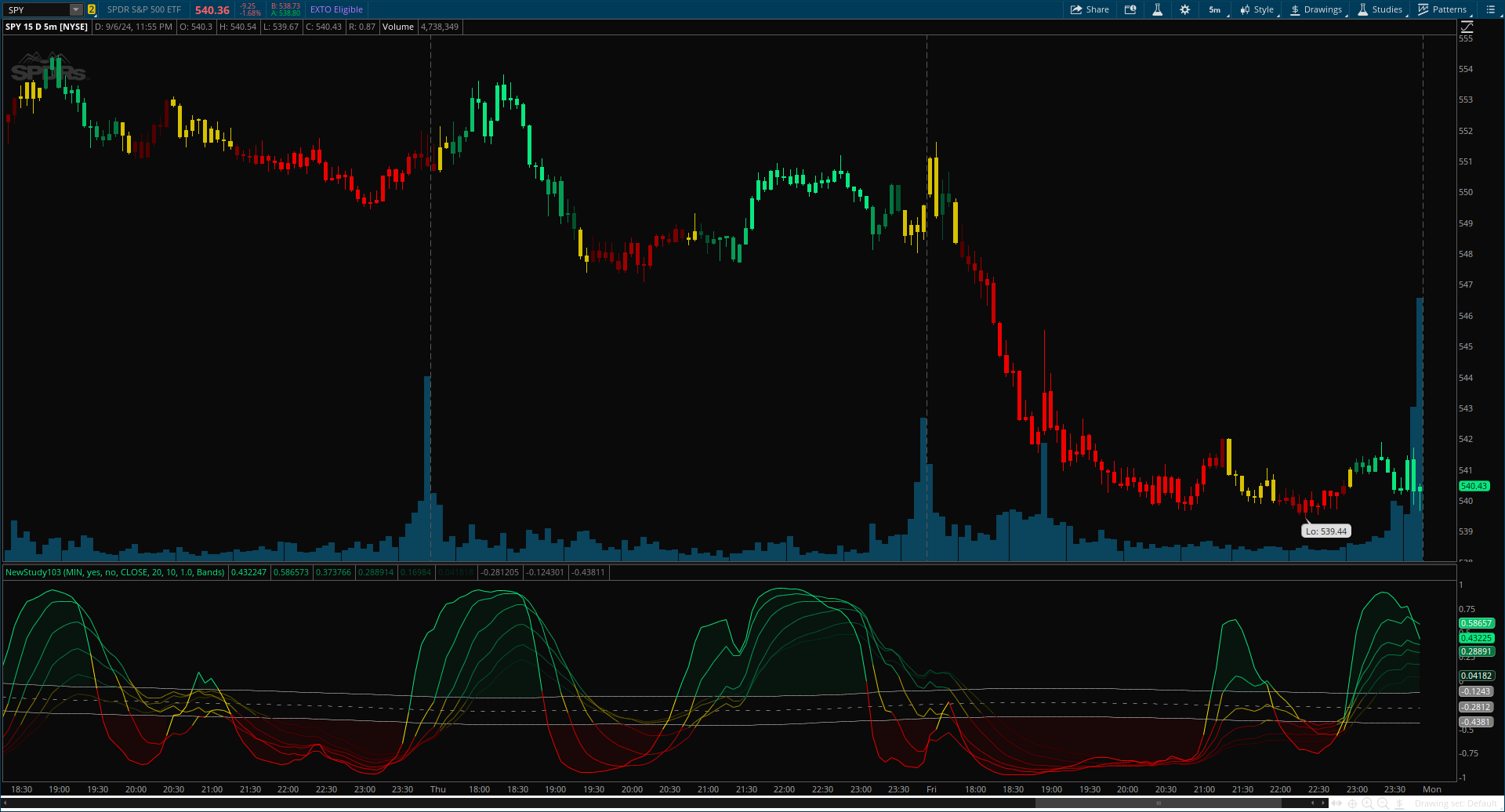
Inverse Fisher Oscillator [BigBeluga] for ThinkOrSwim

samer800

Moderator - Expert
VIP
Lifetime
qPouDBG.png


Author Message:

The Inverse Fisher Oscillator is a powerful tool for identifying market trends and potential reversal points by applying the Inverse Fisher Transform to normalized price data. This indicator plots multiple smoothed oscillators, each color-coded to signify their relation to dynamic volatility bands. Additionally, the Butterworth filter is incorporated to further refine trend signals.

CODE:

CSS:
#// Indicator for TOS
#// © BigBeluga
#indicator("Inverse Fisher Oscillator [BigBeluga]")
# Converted by Sam4Cok@Samer800    - 09/2024

declare lower;
input timeframe = AggregationPeriod.MIN;
input colorBars = yes;
input showLabel = no;
input source = FundamentalType.CLOSE;
input Length  = 20; #, "Length")  // Input for the length of the normalization period
input Smooth  = 10; #, "Smooth")  // Input for the smoothing period
input multi    = 1.0; #, "Bands Multiplier")  // Multiplier for the volatility bands
input MidLineType =  {default "Bands", "Simple"}; # "Mid Line Type:"

def na = Double.NaN;
def last = IsNaN(close);
def current = GetAggregationPeriod();
def tf = Max(current, timeframe);
def src = Fundamental(FundamentalType = source, Period = tf);

#-- colors
DefineGlobalColor("band", Color.GRAY);
DefineGlobalColor("top1", CreateColor(10, 231, 127));
DefineGlobalColor("top2", CreateColor(8, 193, 106));
DefineGlobalColor("top3", CreateColor(7, 156, 86));
DefineGlobalColor("top4", CreateColor(5, 118, 65));
DefineGlobalColor("top5", CreateColor(3, 81, 44));
DefineGlobalColor("top6", CreateColor(2, 43, 24));
DefineGlobalColor("mid1", CreateColor(254, 228, 0));
DefineGlobalColor("mid2", CreateColor(215, 193, 0));
DefineGlobalColor("mid3", CreateColor(176, 158, 0));
DefineGlobalColor("mid4", CreateColor(136, 123, 0));
DefineGlobalColor("mid5", CreateColor(97, 87, 0));
DefineGlobalColor("mid6", CreateColor(58, 52, 0));
DefineGlobalColor("btm1", CreateColor(239, 0, 0));
DefineGlobalColor("btm2", CreateColor(200, 0, 0));
DefineGlobalColor("btm3", CreateColor(161, 0, 0));
DefineGlobalColor("btm4", CreateColor(121, 0, 0));
DefineGlobalColor("btm5", CreateColor(82, 0, 0));
DefineGlobalColor("btm6", CreateColor(62, 0, 0));

#// Method to calculate the inverse Fisher transform
script inverse_fisher {
    input src = close;
    input Length = 20;
    input Smooth = 10;
    def avg = Sum(src, Length) / Length;
    def norm_price = (src - avg) / StDev(src, Length);
    def smWMA = WMA(norm_price, Smooth);
    def norm = (Exp(2 * smWMA) - 1) ;
    def dnor = (Exp(2 * smWMA) + 1);
    def inverse_fisher = norm / dnor;
    plot out = inverse_fisher;
}
#// Calculate the inverse Fisher Oscillator for different smoothed price series
def ifish0  = inverse_fisher(src, Length, Smooth * 1);
def ifish1  = inverse_fisher(src, Length, Smooth * 2);
def ifish2  = inverse_fisher(src, Length, Smooth * 3);
def ifish3  = inverse_fisher(src, Length, Smooth * 4);
def ifish4  = inverse_fisher(src, Length, Smooth * 5);
def ifish5  = inverse_fisher(src, Length, Smooth * 6);

#// Calculate constants for the Butterworth filter
def pi = Double.Pi;
def mid_len  = 500;
def piPrd = pi / mid_len;
def g     = Sqrt(2);
def a1    = Exp(-g * piPrd);
def b1    = 2 * a1 * Cos(g * piPrd);
def coef2 = b1;
def coef3 = -a1 * a1;
def coef1 = (1 - b1 + a1 * a1) / 4;

#// Previous source and butter filter values
def butter;
#// Handle null values using the nz function
def avg = Sum(src, Length) / Length;
def norm_price = (src - avg) / StDev(src, Length);
def smWMA = WMA(norm_price, Smooth);
def prevB1 = if butter[1] then butter[1] else ifish0;
def prevB2 = if butter[2] then butter[2] else prevB1;
def srcB1 = if ifish0[1] then ifish0[1] else ifish0;
def srcB2 = if ifish0[2] then ifish0[2] else srcB1;
#// Calculate the Butterworth filter value
switch (MidLineType) {
case "Simple" :
    butter = 0;
default :
    butter = coef1 * (ifish0 + (2 * srcB1) + srcB2) + (coef2 * prevB1) + (coef3 * prevB2);
}
#// Calculate volatility as the SMA of the absolute difference between the current and previous inverse Fisher values
def volatility = Average(AbsValue(ifish0 - srcB2), 400) * multi;
#// Calculate upper and lower volatility bands
def upper_band = (volatility + butter) * (if butter == 0 then 0 else 1);
def lower_band = (butter - volatility) * (if butter == 0 then 0 else 1);
#// Assign colors to each inverse Fisher Oscillator based on its relation to the volatility bands
def color1 = if ifish0 > upper_band then 1 else if ifish0 < lower_band then -1 else 0;
def color2 = if ifish1 > upper_band then 1 else if ifish1 < lower_band then -1 else 0;
def color3 = if ifish2 > upper_band then 1 else if ifish2 < lower_band then -1 else 0;
def color4 = if ifish3 > upper_band then 1 else if ifish3 < lower_band then -1 else 0;
def color5 = if ifish4 > upper_band then 1 else if ifish4 < lower_band then -1 else 0;
def color6 = if ifish5 > upper_band then 1 else if ifish5 < lower_band then -1 else 0;

#// Plot the inverse Fisher Oscillator lines with corresponding colors
plot f1 = ifish0;
plot f2 = ifish1;
plot f3 = ifish2;
plot f4 = ifish3;
plot f5 = ifish4;
plot f6 = ifish5;
f1.AssignValueColor(if color1>0 then GlobalColor("top1") else
                    if color1<0 then GlobalColor("btm1") else GlobalColor("mid1"));
f2.AssignValueColor(if color2>0 then GlobalColor("top2") else
                    if color2<0 then GlobalColor("btm2") else GlobalColor("mid2"));
f3.AssignValueColor(if color3>0 then GlobalColor("top3") else
                    if color3<0 then GlobalColor("btm3") else GlobalColor("mid3"));
f4.AssignValueColor(if color4>0 then GlobalColor("top4") else
                    if color4<0 then GlobalColor("btm4") else GlobalColor("mid4"));
f5.AssignValueColor(if color5>0 then GlobalColor("top5") else
                    if color5<0 then GlobalColor("btm5") else GlobalColor("mid5"));
f6.AssignValueColor(if color6>0 then GlobalColor("top6") else
                    if color6<0 then GlobalColor("btm6") else GlobalColor("mid6"));
#// Plot the Butterworth filter and volatility bands

plot mid = if last then na else butter; # Plot the Butterworth filter
plot upBand = if upper_band then upper_band else na;
plot dnBand = if lower_band then lower_band else na;
mid.SetStyle(Curve.SHORT_DASH);
mid.SetDefaultColor(GlobalColor("band"));
upBand.SetDefaultColor(GlobalColor("band"));
dnBand.SetDefaultColor(GlobalColor("band"));

#-- Cloud

AddCloud(if ifish0>upper_band then ifish0 else na, upper_band, GlobalColor("top6"));
AddCloud(if ifish0<lower_band then lower_band else na, ifish0, GlobalColor("btm6"));

#-- color Bars
def col = color1 + color2 + color3 + color4 + color5 + color6;
AssignPriceColor(if !colorBars then Color.CURRENT else
                 if col > 5 then GlobalColor("top1") else
                 if col > 4 then GlobalColor("top2") else
                 if col > 3 then GlobalColor("top3") else
                 if col > 2 then GlobalColor("top4") else
                 if col > 1 then GlobalColor("top5") else
                 if col < -5 then GlobalColor("btm1") else
                 if col < -4 then GlobalColor("btm2") else
                 if col < -3 then GlobalColor("btm3") else
                 if col < -2 then GlobalColor("btm4") else
                 if col < -1 then GlobalColor("btm5") else  GlobalColor("mid2"));
#-- LAbel

AddLabel(showLabel, "Trend Strength (" + AsPercent(col / 6) + ")",
                 if col > 5 then GlobalColor("top1") else
                 if col > 4 then GlobalColor("top2") else
                 if col > 3 then GlobalColor("top3") else
                 if col > 2 then GlobalColor("top4") else
                 if col > 1 then GlobalColor("top5") else
                 if col < -5 then GlobalColor("btm1") else
                 if col < -4 then GlobalColor("btm2") else
                 if col < -3 then GlobalColor("btm3") else
                 if col < -2 then GlobalColor("btm4") else
                 if col < -1 then GlobalColor("btm5") else  GlobalColor("mid2"));

#-- END of CODE
 

Join useThinkScript to post your question to a community of 21,000+ developers and traders.

Here is the Scanner you can change direction by selecting plots at the bottom.

Code:
input timeframe = AggregationPeriod.MIN;
input colorBars = yes;
input showLabel = no;
input source = FundamentalType.CLOSE;
input Length  = 20; #, "Length")  // Input for the length of the normalization period
input Smooth  = 10; #, "Smooth")  // Input for the smoothing period
input multi    = 1.0; #, "Bands Multiplier")  // Multiplier for the volatility bands
input MidLineType =  {default "Bands", "Simple"}; # "Mid Line Type:"

def na = Double.NaN;
def last = IsNaN(close);
def current = GetAggregationPeriod();
def tf = Max(current, timeframe);
def src = Fundamental(FundamentalType = source, Period = tf);

#-- colors
DefineGlobalColor("band", Color.GRAY);
DefineGlobalColor("top1", CreateColor(10, 231, 127));
DefineGlobalColor("top2", CreateColor(8, 193, 106));
DefineGlobalColor("top3", CreateColor(7, 156, 86));
DefineGlobalColor("top4", CreateColor(5, 118, 65));
DefineGlobalColor("top5", CreateColor(3, 81, 44));
DefineGlobalColor("top6", CreateColor(2, 43, 24));
DefineGlobalColor("mid1", CreateColor(254, 228, 0));
DefineGlobalColor("mid2", CreateColor(215, 193, 0));
DefineGlobalColor("mid3", CreateColor(176, 158, 0));
DefineGlobalColor("mid4", CreateColor(136, 123, 0));
DefineGlobalColor("mid5", CreateColor(97, 87, 0));
DefineGlobalColor("mid6", CreateColor(58, 52, 0));
DefineGlobalColor("btm1", CreateColor(239, 0, 0));
DefineGlobalColor("btm2", CreateColor(200, 0, 0));
DefineGlobalColor("btm3", CreateColor(161, 0, 0));
DefineGlobalColor("btm4", CreateColor(121, 0, 0));
DefineGlobalColor("btm5", CreateColor(82, 0, 0));
DefineGlobalColor("btm6", CreateColor(62, 0, 0));

#// Method to calculate the inverse Fisher transform
script inverse_fisher {
    input src = close;
    input Length = 20;
    input Smooth = 10;
    def avg = Sum(src, Length) / Length;
    def norm_price = (src - avg) / StDev(src, Length);
    def smWMA = WMA(norm_price, Smooth);
    def norm = (Exp(2 * smWMA) - 1) ;
    def dnor = (Exp(2 * smWMA) + 1);
    def inverse_fisher = norm / dnor;
    plot out = inverse_fisher;
}
#// Calculate the inverse Fisher Oscillator for different smoothed price series
def ifish0  = inverse_fisher(src, Length, Smooth * 1);
def ifish1  = inverse_fisher(src, Length, Smooth * 2);
def ifish2  = inverse_fisher(src, Length, Smooth * 3);
def ifish3  = inverse_fisher(src, Length, Smooth * 4);
def ifish4  = inverse_fisher(src, Length, Smooth * 5);
def ifish5  = inverse_fisher(src, Length, Smooth * 6);

#// Calculate constants for the Butterworth filter
def pi = Double.Pi;
def mid_len  = 500;
def piPrd = pi / mid_len;
def g     = Sqrt(2);
def a1    = Exp(-g * piPrd);
def b1    = 2 * a1 * Cos(g * piPrd);
def coef2 = b1;
def coef3 = -a1 * a1;
def coef1 = (1 - b1 + a1 * a1) / 4;

#// Previous source and butter filter values
def butter;
#// Handle null values using the nz function
def avg = Sum(src, Length) / Length;
def norm_price = (src - avg) / StDev(src, Length);
def smWMA = WMA(norm_price, Smooth);
def prevB1 = if butter[1] then butter[1] else ifish0;
def prevB2 = if butter[2] then butter[2] else prevB1;
def srcB1 = if ifish0[1] then ifish0[1] else ifish0;
def srcB2 = if ifish0[2] then ifish0[2] else srcB1;
#// Calculate the Butterworth filter value
switch (MidLineType) {
case "Simple" :
    butter = 0;
default :
    butter = coef1 * (ifish0 + (2 * srcB1) + srcB2) + (coef2 * prevB1) + (coef3 * prevB2);
}
#// Calculate volatility as the SMA of the absolute difference between the current and previous inverse Fisher values
def volatility = Average(AbsValue(ifish0 - srcB2), 400) * multi;
#// Calculate upper and lower volatility bands
def upper_band = (volatility + butter) * (if butter == 0 then 0 else 1);
def lower_band = (butter - volatility) * (if butter == 0 then 0 else 1);
#// Assign colors to each inverse Fisher Oscillator based on its relation to the volatility bands
def color1 = if ifish0 > upper_band then 1 else if ifish0 < lower_band then -1 else 0;
def color2 = if ifish1 > upper_band then 1 else if ifish1 < lower_band then -1 else 0;
def color3 = if ifish2 > upper_band then 1 else if ifish2 < lower_band then -1 else 0;
def color4 = if ifish3 > upper_band then 1 else if ifish3 < lower_band then -1 else 0;
def color5 = if ifish4 > upper_band then 1 else if ifish4 < lower_band then -1 else 0;
def color6 = if ifish5 > upper_band then 1 else if ifish5 < lower_band then -1 else 0;

#// Plot the inverse Fisher Oscillator lines with corresponding colors
def f1 = ifish0;

# Down Turn
Plot Histy = f1 < f1 [1] and f1 [1] > f1 [2] and f1 > 0; # Down Turn

# Up Turn
#Plot Histy = f1 > f1 [1] and f1 [1] < f1 [2] and f1 < 0; # Up Turn
 
qPouDBG.png


Author Message:

The Inverse Fisher Oscillator is a powerful tool for identifying market trends and potential reversal points by applying the Inverse Fisher Transform to normalized price data. This indicator plots multiple smoothed oscillators, each color-coded to signify their relation to dynamic volatility bands. Additionally, the Butterworth filter is incorporated to further refine trend signals.

CODE:

CSS:
#// Indicator for TOS
#// © BigBeluga
#indicator("Inverse Fisher Oscillator [BigBeluga]")
# Converted by Sam4Cok@Samer800    - 09/2024

declare lower;
input timeframe = AggregationPeriod.MIN;
input colorBars = yes;
input showLabel = no;
input source = FundamentalType.CLOSE;
input Length  = 20; #, "Length")  // Input for the length of the normalization period
input Smooth  = 10; #, "Smooth")  // Input for the smoothing period
input multi    = 1.0; #, "Bands Multiplier")  // Multiplier for the volatility bands
input MidLineType =  {default "Bands", "Simple"}; # "Mid Line Type:"

def na = Double.NaN;
def last = IsNaN(close);
def current = GetAggregationPeriod();
def tf = Max(current, timeframe);
def src = Fundamental(FundamentalType = source, Period = tf);

#-- colors
DefineGlobalColor("band", Color.GRAY);
DefineGlobalColor("top1", CreateColor(10, 231, 127));
DefineGlobalColor("top2", CreateColor(8, 193, 106));
DefineGlobalColor("top3", CreateColor(7, 156, 86));
DefineGlobalColor("top4", CreateColor(5, 118, 65));
DefineGlobalColor("top5", CreateColor(3, 81, 44));
DefineGlobalColor("top6", CreateColor(2, 43, 24));
DefineGlobalColor("mid1", CreateColor(254, 228, 0));
DefineGlobalColor("mid2", CreateColor(215, 193, 0));
DefineGlobalColor("mid3", CreateColor(176, 158, 0));
DefineGlobalColor("mid4", CreateColor(136, 123, 0));
DefineGlobalColor("mid5", CreateColor(97, 87, 0));
DefineGlobalColor("mid6", CreateColor(58, 52, 0));
DefineGlobalColor("btm1", CreateColor(239, 0, 0));
DefineGlobalColor("btm2", CreateColor(200, 0, 0));
DefineGlobalColor("btm3", CreateColor(161, 0, 0));
DefineGlobalColor("btm4", CreateColor(121, 0, 0));
DefineGlobalColor("btm5", CreateColor(82, 0, 0));
DefineGlobalColor("btm6", CreateColor(62, 0, 0));

#// Method to calculate the inverse Fisher transform
script inverse_fisher {
    input src = close;
    input Length = 20;
    input Smooth = 10;
    def avg = Sum(src, Length) / Length;
    def norm_price = (src - avg) / StDev(src, Length);
    def smWMA = WMA(norm_price, Smooth);
    def norm = (Exp(2 * smWMA) - 1) ;
    def dnor = (Exp(2 * smWMA) + 1);
    def inverse_fisher = norm / dnor;
    plot out = inverse_fisher;
}
#// Calculate the inverse Fisher Oscillator for different smoothed price series
def ifish0  = inverse_fisher(src, Length, Smooth * 1);
def ifish1  = inverse_fisher(src, Length, Smooth * 2);
def ifish2  = inverse_fisher(src, Length, Smooth * 3);
def ifish3  = inverse_fisher(src, Length, Smooth * 4);
def ifish4  = inverse_fisher(src, Length, Smooth * 5);
def ifish5  = inverse_fisher(src, Length, Smooth * 6);

#// Calculate constants for the Butterworth filter
def pi = Double.Pi;
def mid_len  = 500;
def piPrd = pi / mid_len;
def g     = Sqrt(2);
def a1    = Exp(-g * piPrd);
def b1    = 2 * a1 * Cos(g * piPrd);
def coef2 = b1;
def coef3 = -a1 * a1;
def coef1 = (1 - b1 + a1 * a1) / 4;

#// Previous source and butter filter values
def butter;
#// Handle null values using the nz function
def avg = Sum(src, Length) / Length;
def norm_price = (src - avg) / StDev(src, Length);
def smWMA = WMA(norm_price, Smooth);
def prevB1 = if butter[1] then butter[1] else ifish0;
def prevB2 = if butter[2] then butter[2] else prevB1;
def srcB1 = if ifish0[1] then ifish0[1] else ifish0;
def srcB2 = if ifish0[2] then ifish0[2] else srcB1;
#// Calculate the Butterworth filter value
switch (MidLineType) {
case "Simple" :
    butter = 0;
default :
    butter = coef1 * (ifish0 + (2 * srcB1) + srcB2) + (coef2 * prevB1) + (coef3 * prevB2);
}
#// Calculate volatility as the SMA of the absolute difference between the current and previous inverse Fisher values
def volatility = Average(AbsValue(ifish0 - srcB2), 400) * multi;
#// Calculate upper and lower volatility bands
def upper_band = (volatility + butter) * (if butter == 0 then 0 else 1);
def lower_band = (butter - volatility) * (if butter == 0 then 0 else 1);
#// Assign colors to each inverse Fisher Oscillator based on its relation to the volatility bands
def color1 = if ifish0 > upper_band then 1 else if ifish0 < lower_band then -1 else 0;
def color2 = if ifish1 > upper_band then 1 else if ifish1 < lower_band then -1 else 0;
def color3 = if ifish2 > upper_band then 1 else if ifish2 < lower_band then -1 else 0;
def color4 = if ifish3 > upper_band then 1 else if ifish3 < lower_band then -1 else 0;
def color5 = if ifish4 > upper_band then 1 else if ifish4 < lower_band then -1 else 0;
def color6 = if ifish5 > upper_band then 1 else if ifish5 < lower_band then -1 else 0;

#// Plot the inverse Fisher Oscillator lines with corresponding colors
plot f1 = ifish0;
plot f2 = ifish1;
plot f3 = ifish2;
plot f4 = ifish3;
plot f5 = ifish4;
plot f6 = ifish5;
f1.AssignValueColor(if color1>0 then GlobalColor("top1") else
                    if color1<0 then GlobalColor("btm1") else GlobalColor("mid1"));
f2.AssignValueColor(if color2>0 then GlobalColor("top2") else
                    if color2<0 then GlobalColor("btm2") else GlobalColor("mid2"));
f3.AssignValueColor(if color3>0 then GlobalColor("top3") else
                    if color3<0 then GlobalColor("btm3") else GlobalColor("mid3"));
f4.AssignValueColor(if color4>0 then GlobalColor("top4") else
                    if color4<0 then GlobalColor("btm4") else GlobalColor("mid4"));
f5.AssignValueColor(if color5>0 then GlobalColor("top5") else
                    if color5<0 then GlobalColor("btm5") else GlobalColor("mid5"));
f6.AssignValueColor(if color6>0 then GlobalColor("top6") else
                    if color6<0 then GlobalColor("btm6") else GlobalColor("mid6"));
#// Plot the Butterworth filter and volatility bands

plot mid = if last then na else butter; # Plot the Butterworth filter
plot upBand = if upper_band then upper_band else na;
plot dnBand = if lower_band then lower_band else na;
mid.SetStyle(Curve.SHORT_DASH);
mid.SetDefaultColor(GlobalColor("band"));
upBand.SetDefaultColor(GlobalColor("band"));
dnBand.SetDefaultColor(GlobalColor("band"));

#-- Cloud

AddCloud(if ifish0>upper_band then ifish0 else na, upper_band, GlobalColor("top6"));
AddCloud(if ifish0<lower_band then lower_band else na, ifish0, GlobalColor("btm6"));

#-- color Bars
def col = color1 + color2 + color3 + color4 + color5 + color6;
AssignPriceColor(if !colorBars then Color.CURRENT else
                 if col > 5 then GlobalColor("top1") else
                 if col > 4 then GlobalColor("top2") else
                 if col > 3 then GlobalColor("top3") else
                 if col > 2 then GlobalColor("top4") else
                 if col > 1 then GlobalColor("top5") else
                 if col < -5 then GlobalColor("btm1") else
                 if col < -4 then GlobalColor("btm2") else
                 if col < -3 then GlobalColor("btm3") else
                 if col < -2 then GlobalColor("btm4") else
                 if col < -1 then GlobalColor("btm5") else  GlobalColor("mid2"));
#-- LAbel

AddLabel(showLabel, "Trend Strength (" + AsPercent(col / 6) + ")",
                 if col > 5 then GlobalColor("top1") else
                 if col > 4 then GlobalColor("top2") else
                 if col > 3 then GlobalColor("top3") else
                 if col > 2 then GlobalColor("top4") else
                 if col > 1 then GlobalColor("top5") else
                 if col < -5 then GlobalColor("btm1") else
                 if col < -4 then GlobalColor("btm2") else
                 if col < -3 then GlobalColor("btm3") else
                 if col < -2 then GlobalColor("btm4") else
                 if col < -1 then GlobalColor("btm5") else  GlobalColor("mid2"));

#-- END of CODE
Hey Samer,
Will you modify so user can individually input settings and colors to the 6 plots? Thank you so much for all the posts and work you do!
Grateful
 
Hey Samer,
Will you modify so user can individually input settings and colors to the 6 plots? Thank you so much for all the posts and work you do!
Grateful

Individual Input Settings and Colors -- 6 Plots
Ruby:
#// Indicator for TOS
#// © BigBeluga
# Converted by Sam4Cok@Samer800 – 09/2024
# Updated: per-plot color-group selection

declare lower;

input timeframe = AggregationPeriod.MIN;
input colorBars = yes;
input showLabel = no;
input source = FundamentalType.CLOSE;
input Length  = 20;
input Smooth  = 10;
input multi   = 1.0;
input MidLineType = {default "Bands", "Simple"};

#---------------------------
# DEFINE COLOR GROUPS (Global)
# Each group provides TOP / MID / BTM colors used by the plots
#---------------------------
# GROUP 1
DefineGlobalColor("G1_top", CreateColor(10,231,127));
DefineGlobalColor("G1_mid", CreateColor(254,228,0));
DefineGlobalColor("G1_btm", CreateColor(239,0,0));

# GROUP 2
DefineGlobalColor("G2_top", CreateColor(8,193,106));
DefineGlobalColor("G2_mid", CreateColor(215,193,0));
DefineGlobalColor("G2_btm", CreateColor(200,0,0));

# GROUP 3
DefineGlobalColor("G3_top", CreateColor(7,156,86));
DefineGlobalColor("G3_mid", CreateColor(176,158,0));
DefineGlobalColor("G3_btm", CreateColor(161,0,0));

# GROUP 4
DefineGlobalColor("G4_top", CreateColor(5,118,65));
DefineGlobalColor("G4_mid", CreateColor(136,123,0));
DefineGlobalColor("G4_btm", CreateColor(121,0,0));

# GROUP 5
DefineGlobalColor("G5_top", CreateColor(3,81,44));
DefineGlobalColor("G5_mid", CreateColor(97,87,0));
DefineGlobalColor("G5_btm", CreateColor(82,0,0));

# GROUP 6
DefineGlobalColor("G6_top", CreateColor(2,43,24));
DefineGlobalColor("G6_mid", CreateColor(58,52,0));
DefineGlobalColor("G6_btm", CreateColor(62,0,0));

# band color (midline / bands)
DefineGlobalColor("band", Color.GRAY);

#---------------------------
# USER SELECTS COLOR GROUP FOR EACH PLOT (integers 1..6)
# and per-plot visibility & line weight
#---------------------------
input f1_colorGroup = 1;
input f2_colorGroup = 2;
input f3_colorGroup = 3;
input f4_colorGroup = 4;
input f5_colorGroup = 5;
input f6_colorGroup = 6;

input showPlot1 = yes;
input showPlot2 = yes;
input showPlot3 = yes;
input showPlot4 = yes;
input showPlot5 = yes;
input showPlot6 = yes;

input lineWeight1 = 1;
input lineWeight2 = 1;
input lineWeight3 = 1;
input lineWeight4 = 1;
input lineWeight5 = 1;
input lineWeight6 = 2;

#-------------------------------------------
# Core inputs & data
#-------------------------------------------
def current = GetAggregationPeriod();
def tf = Max(current, timeframe);
def src = Fundamental(FundamentalType = source, Period = tf);

script inverse_fisher {
    input src = close;
    input Length = 20;
    input Smooth = 10;
    def avg = Sum(src, Length) / Length;
    def norm_price = (src - avg) / StDev(src, Length);
    def smWMA = WMA(norm_price, Smooth);
    def norm = (Exp(2 * smWMA) - 1);
    def dnor = (Exp(2 * smWMA) + 1);
    plot out = norm / dnor;
}

def ifish0  = inverse_fisher(src, Length, Smooth * 1);
def ifish1  = inverse_fisher(src, Length, Smooth * 2);
def ifish2  = inverse_fisher(src, Length, Smooth * 3);
def ifish3  = inverse_fisher(src, Length, Smooth * 4);
def ifish4  = inverse_fisher(src, Length, Smooth * 5);
def ifish5  = inverse_fisher(src, Length, Smooth * 6);

#-------------------------------------------
# Corrected Butterworth / midline block (handles recursion safely)
#-------------------------------------------
# declare butter placeholder (allows referencing butter[1]/butter[2])
def butter;

# previous inverse-fisher source samples
def srcB1 = ifish0[1];
def srcB2 = ifish0[2];

# prevB1 / prevB2 safely fall back to ifish0 when butter[1]/butter[2] are not available
def prevB1 = if IsNaN(butter[1]) then ifish0 else butter[1];
def prevB2 = if IsNaN(butter[2]) then prevB1 else butter[2];

# constants for filter
def pi = Double.Pi;
def mid_len  = 500;
def piPrd = pi / mid_len;
def g     = Sqrt(2);
def a1    = Exp(-g * piPrd);
def b1    = 2 * a1 * Cos(g * piPrd);
def coef2 = b1;
def coef3 = -a1 * a1;
def coef1 = (1 - b1 + a1 * a1) / 4;

# Now assign butter (this may reference butter[1]/butter[2], which is OK because of the placeholder above)
switch (MidLineType) {
case "Simple":
    butter = 0;
default:
    butter = coef1 * (ifish0 + (2 * srcB1) + srcB2) + (coef2 * prevB1) + (coef3 * prevB2);
}

#-------------------------------------------
# Volatility bands
#-------------------------------------------
def volatility = Average(AbsValue(ifish0 - srcB2), 400) * multi;
def upper_band = (volatility + butter) * (if butter == 0 then 0 else 1);
def lower_band = (butter - volatility) * (if butter == 0 then 0 else 1);

# state for each smooth series: +1 top, -1 bottom, 0 mid
def c1 = if ifish0 > upper_band then 1 else if ifish0 < lower_band then -1 else 0;
def c2 = if ifish1 > upper_band then 1 else if ifish1 < lower_band then -1 else 0;
def c3 = if ifish2 > upper_band then 1 else if ifish2 < lower_band then -1 else 0;
def c4 = if ifish3 > upper_band then 1 else if ifish3 < lower_band then -1 else 0;
def c5 = if ifish4 > upper_band then 1 else if ifish4 < lower_band then -1 else 0;
def c6 = if ifish5 > upper_band then 1 else if ifish5 < lower_band then -1 else 0;

#-------------------------------------------
# Plot lines — colors chosen inline via GlobalColor(...) only (no color vars)
#-------------------------------------------
plot f1 = ifish0;
plot f2 = ifish1;
plot f3 = ifish2;
plot f4 = ifish3;
plot f5 = ifish4;
plot f6 = ifish5;

# f1
f1.AssignValueColor(
    if c1 > 0 then
        if f1_colorGroup == 1 then GlobalColor("G1_top")
        else if f1_colorGroup == 2 then GlobalColor("G2_top")
        else if f1_colorGroup == 3 then GlobalColor("G3_top")
        else if f1_colorGroup == 4 then GlobalColor("G4_top")
        else if f1_colorGroup == 5 then GlobalColor("G5_top")
        else GlobalColor("G6_top")
    else if c1 < 0 then
        if f1_colorGroup == 1 then GlobalColor("G1_btm")
        else if f1_colorGroup == 2 then GlobalColor("G2_btm")
        else if f1_colorGroup == 3 then GlobalColor("G3_btm")
        else if f1_colorGroup == 4 then GlobalColor("G4_btm")
        else if f1_colorGroup == 5 then GlobalColor("G5_btm")
        else GlobalColor("G6_btm")
    else
        if f1_colorGroup == 1 then GlobalColor("G1_mid")
        else if f1_colorGroup == 2 then GlobalColor("G2_mid")
        else if f1_colorGroup == 3 then GlobalColor("G3_mid")
        else if f1_colorGroup == 4 then GlobalColor("G4_mid")
        else if f1_colorGroup == 5 then GlobalColor("G5_mid")
        else GlobalColor("G6_mid")
);

# f2
f2.AssignValueColor(
    if c2 > 0 then
        if f2_colorGroup == 1 then GlobalColor("G1_top")
        else if f2_colorGroup == 2 then GlobalColor("G2_top")
        else if f2_colorGroup == 3 then GlobalColor("G3_top")
        else if f2_colorGroup == 4 then GlobalColor("G4_top")
        else if f2_colorGroup == 5 then GlobalColor("G5_top")
        else GlobalColor("G6_top")
    else if c2 < 0 then
        if f2_colorGroup == 1 then GlobalColor("G1_btm")
        else if f2_colorGroup == 2 then GlobalColor("G2_btm")
        else if f2_colorGroup == 3 then GlobalColor("G3_btm")
        else if f2_colorGroup == 4 then GlobalColor("G4_btm")
        else if f2_colorGroup == 5 then GlobalColor("G5_btm")
        else GlobalColor("G6_btm")
    else
        if f2_colorGroup == 1 then GlobalColor("G1_mid")
        else if f2_colorGroup == 2 then GlobalColor("G2_mid")
        else if f2_colorGroup == 3 then GlobalColor("G3_mid")
        else if f2_colorGroup == 4 then GlobalColor("G4_mid")
        else if f2_colorGroup == 5 then GlobalColor("G5_mid")
        else GlobalColor("G6_mid")
);

# f3
f3.AssignValueColor(
    if c3 > 0 then
        if f3_colorGroup == 1 then GlobalColor("G1_top")
        else if f3_colorGroup == 2 then GlobalColor("G2_top")
        else if f3_colorGroup == 3 then GlobalColor("G3_top")
        else if f3_colorGroup == 4 then GlobalColor("G4_top")
        else if f3_colorGroup == 5 then GlobalColor("G5_top")
        else GlobalColor("G6_top")
    else if c3 < 0 then
        if f3_colorGroup == 1 then GlobalColor("G1_btm")
        else if f3_colorGroup == 2 then GlobalColor("G2_btm")
        else if f3_colorGroup == 3 then GlobalColor("G3_btm")
        else if f3_colorGroup == 4 then GlobalColor("G4_btm")
        else if f3_colorGroup == 5 then GlobalColor("G5_btm")
        else GlobalColor("G6_btm")
    else
        if f3_colorGroup == 1 then GlobalColor("G1_mid")
        else if f3_colorGroup == 2 then GlobalColor("G2_mid")
        else if f3_colorGroup == 3 then GlobalColor("G3_mid")
        else if f3_colorGroup == 4 then GlobalColor("G4_mid")
        else if f3_colorGroup == 5 then GlobalColor("G5_mid")
        else GlobalColor("G6_mid")
);

# f4
f4.AssignValueColor(
    if c4 > 0 then
        if f4_colorGroup == 1 then GlobalColor("G1_top")
        else if f4_colorGroup == 2 then GlobalColor("G2_top")
        else if f4_colorGroup == 3 then GlobalColor("G3_top")
        else if f4_colorGroup == 4 then GlobalColor("G4_top")
        else if f4_colorGroup == 5 then GlobalColor("G5_top")
        else GlobalColor("G6_top")
    else if c4 < 0 then
        if f4_colorGroup == 1 then GlobalColor("G1_btm")
        else if f4_colorGroup == 2 then GlobalColor("G2_btm")
        else if f4_colorGroup == 3 then GlobalColor("G3_btm")
        else if f4_colorGroup == 4 then GlobalColor("G4_btm")
        else if f4_colorGroup == 5 then GlobalColor("G5_btm")
        else GlobalColor("G6_btm")
    else
        if f4_colorGroup == 1 then GlobalColor("G1_mid")
        else if f4_colorGroup == 2 then GlobalColor("G2_mid")
        else if f4_colorGroup == 3 then GlobalColor("G3_mid")
        else if f4_colorGroup == 4 then GlobalColor("G4_mid")
        else if f4_colorGroup == 5 then GlobalColor("G5_mid")
        else GlobalColor("G6_mid")
);

# f5
f5.AssignValueColor(
    if c5 > 0 then
        if f5_colorGroup == 1 then GlobalColor("G1_top")
        else if f5_colorGroup == 2 then GlobalColor("G2_top")
        else if f5_colorGroup == 3 then GlobalColor("G3_top")
        else if f5_colorGroup == 4 then GlobalColor("G4_top")
        else if f5_colorGroup == 5 then GlobalColor("G5_top")
        else GlobalColor("G6_top")
    else if c5 < 0 then
        if f5_colorGroup == 1 then GlobalColor("G1_btm")
        else if f5_colorGroup == 2 then GlobalColor("G2_btm")
        else if f5_colorGroup == 3 then GlobalColor("G3_btm")
        else if f5_colorGroup == 4 then GlobalColor("G4_btm")
        else if f5_colorGroup == 5 then GlobalColor("G5_btm")
        else GlobalColor("G6_btm")
    else
        if f5_colorGroup == 1 then GlobalColor("G1_mid")
        else if f5_colorGroup == 2 then GlobalColor("G2_mid")
        else if f5_colorGroup == 3 then GlobalColor("G3_mid")
        else if f5_colorGroup == 4 then GlobalColor("G4_mid")
        else if f5_colorGroup == 5 then GlobalColor("G5_mid")
        else GlobalColor("G6_mid")
);

# f6
f6.AssignValueColor(
    if c6 > 0 then
        if f6_colorGroup == 1 then GlobalColor("G1_top")
        else if f6_colorGroup == 2 then GlobalColor("G2_top")
        else if f6_colorGroup == 3 then GlobalColor("G3_top")
        else if f6_colorGroup == 4 then GlobalColor("G4_top")
        else if f6_colorGroup == 5 then GlobalColor("G5_top")
        else GlobalColor("G6_top")
    else if c6 < 0 then
        if f6_colorGroup == 1 then GlobalColor("G1_btm")
        else if f6_colorGroup == 2 then GlobalColor("G2_btm")
        else if f6_colorGroup == 3 then GlobalColor("G3_btm")
        else if f6_colorGroup == 4 then GlobalColor("G4_btm")
        else if f6_colorGroup == 5 then GlobalColor("G5_btm")
        else GlobalColor("G6_btm")
    else
        if f6_colorGroup == 1 then GlobalColor("G1_mid")
        else if f6_colorGroup == 2 then GlobalColor("G2_mid")
        else if f6_colorGroup == 3 then GlobalColor("G3_mid")
        else if f6_colorGroup == 4 then GlobalColor("G4_mid")
        else if f6_colorGroup == 5 then GlobalColor("G5_mid")
        else GlobalColor("G6_mid")
);

# set weights & hiding
f1.SetLineWeight(lineWeight1); f1.SetHiding(!showPlot1);
f2.SetLineWeight(lineWeight2); f2.SetHiding(!showPlot2);
f3.SetLineWeight(lineWeight3); f3.SetHiding(!showPlot3);
f4.SetLineWeight(lineWeight4); f4.SetHiding(!showPlot4);
f5.SetLineWeight(lineWeight5); f5.SetHiding(!showPlot5);
f6.SetLineWeight(lineWeight6); f6.SetHiding(!showPlot6);

#-------------------------------------------
# Bands and midline (use SetDefaultColor with GlobalColor)
#-------------------------------------------
plot mid = butter;
plot upBand = upper_band;
plot dnBand = lower_band;
mid.SetStyle(Curve.SHORT_DASH);
mid.SetDefaultColor(GlobalColor("band"));
upBand.SetDefaultColor(GlobalColor("band"));
dnBand.SetDefaultColor(GlobalColor("band"));

# Clouds - use GlobalColor directly
AddCloud(if ifish0 > upper_band then ifish0 else Double.NaN, upper_band, GlobalColor("G6_top"));
AddCloud(if ifish0 < lower_band then lower_band else Double.NaN, ifish0, GlobalColor("G6_btm"));

#-- color Bars (representative mapping using G1 family; adapt if you prefer a different mapping)
def col = c1 + c2 + c3 + c4 + c5 + c6;
AssignPriceColor(
    if !colorBars then Color.CURRENT
    else if col > 0 then GlobalColor("G1_top")
    else if col < 0 then GlobalColor("G1_btm")
    else GlobalColor("G1_mid")
);

#-- Label
AddLabel(showLabel, "Trend Strength (" + AsPercent(col / 6) + ")",
    if col > 0 then GlobalColor("G1_top")
    else if col < 0 then GlobalColor("G1_btm")
    else GlobalColor("G1_mid")
);

#-- END OF SCRIPT
 
Hello All,

I like this indictor a lot, it tells me to just stay out (walk away) or when to start looking at it.

I have a question, I like to look at numerical stats, and I like to add in variance # or %.

I currently have the script to do the following -

1. Find the difference between F0 and dnBand - I apply this to all the F0 - F5.
2. Add them up to get me a number to give me the data strength.

The question I have, should I do the variance based off dnBand, or Mid? or do both?

Thanks, jrj4774
Code:
def numericalDifference0 = ifish0 - dnBand;
def numericalDifference1 = ifish1 - dnBand;
def numericalDifference2 = ifish2 - dnBand;
def numericalDifference3 = ifish3 - dnBand;
def numericalDifference4 = ifish4 - dnBand;
def numericalDifference5 = ifish5 - dnBand;


AddLabel(yes, "F0: " + numericalDifference0 ,
if numericalDifference0> 0 then Color.GREEN else Color.RED);

AddLabel(yes, "F1: " + numericalDifference1 ,
if numericalDifference1> 0 then Color.GREEN else Color.RED);

AddLabel(yes, "F2: " + numericalDifference2 ,
if numericalDifference2> 0 then Color.GREEN else Color.RED);

AddLabel(yes, "F3: " + numericalDifference3 ,
if numericalDifference3> 0 then Color.GREEN else Color.RED);

AddLabel(yes, "F4: " + numericalDifference4 ,
if numericalDifference4> 0 then Color.GREEN else Color.RED);

AddLabel(yes, "F5: " + numericalDifference5 ,
if numericalDifference5> 0 then Color.GREEN else Color.RED);

def Status = numericalDifference0 + numericalDifference1 + numericalDifference2 +numericalDifference3+numericalDifference4+numericalDifference5;

AddLabel(yes, "Status: " + Status, if Status > 0 then Color.GREEN else Color.RED,LOCATION.BOTTOM_LEFT);
AddLabel(yes, if Status > 0 then "++++++++++++++++++++++++++++++++++++++BUY" else "------------------------------------>WALK AWAY", if Status > 0 then Color.GREEN else Color.RED,LOCATION.BOTTOM_LEFT);

.
 
Last edited by a moderator:
The question I have, should I do the variance based off dnBand, or Mid? or do both?

You’re on the right track with your approach. Since you’re measuring the relative position and “strength” of each inverse Fisher signal (ifish0 through ifish5) in relation to a band, the choice of reference line (either dnBand or mid) changes what kind of variance you’re measuring and how it should be interpreted.

1. Variance from dnBand
Use this when:
You want to evaluate how strongly the current conditions are moving off a low zone (potential reversal or bounce detection).
You’re focusing on oversold-to-neutral transitions.

2. Variance from mid
Use this when:
You’re trying to capture trend direction and strength rather than just turning points.
You want a symmetrical indicator: variance above mid = bullish pressure, variance below = bearish pressure.

3. Doing Both (Recommended)
Combining both gives the richest signal context — one measures trend deviation, the other volatility offset.
Use mid-based variance for directional strength,
Use band-based variance for extremity or exhaustion.

That combination lets you spot when signals are not just above the lower band, but also significantly above mid — meaning both strength and momentum are aligned (ideal buy conditions).

Recommendation
If your goal is trend confirmation strength, variance from mid makes more sense.
If your goal is extreme reversal strength, use dnBand.

read more about how to use oscillators and what to watch out for:
https://usethinkscript.com/threads/using-oscillators-profitably-in-thinkorswim.11497/
 
Last edited by a moderator:
@useThinkScript

Thank you for the insight. Yes I wanted to add more confirmation that I'm buying based on the directional strength. It's so easy to get in a stock, but you ask yourself if it was the right choice or not. Added both in there, and I only added one line for upBand data for when to exit.

The only draw back is that there's alot of numerical data and I cant even round it.

thanks,
jrj4774

1765905124840.png
 
@merryDay Thanks for the recommendation. I have added the rounding.

I have a question, I never added line plots before.
Would you be able to help me plot this line?

plot percentageExit2 = ((mid -upBand)/upBand)*100;

The Inverse Oscillator disappeared when I added it. :unsure:

Is it possible to plot the Trend Strength?

thanks,
jrj4774
 
Last edited:
@merryDay Thanks for the recommendation. I have added the rounding.

I have a question, I never added line plots before.
Would you be able to help me plot this line?

plot percentageExit2 = ((mid -upBand)/upBand)*100;

The Inverse Oscillator disappeared when I added it. :unsure:

thanks,
jrj4774

You are not on the same scale. The oscillator boundaries are from -1 to 1
Your percentage is from 0 to 100. Meaning, your plotted percentage line is 100x above your oscillator.
The Inverse Oscillator did not disappear; it is way down there by the zero line that it oscillates around.

I don't think it will do what you want, but if you remove the *100 from your plot; at least the percentage scale won't obliterate the oscillator.
 
@merryDay I just realized that, my apologies. Adding the plot didn't tell me much, so that idea is scratched. Back to the drawing board...
 

Similar threads

Not the exact question you're looking for?

Start a new thread and receive assistance from our community.

87k+ Posts
850 Online
Create Post

Similar threads

Similar threads

The Market Trading Game Changer

Join 2,500+ subscribers inside the useThinkScript VIP Membership Club
  • Exclusive indicators
  • Proven strategies & setups
  • Private Discord community
  • ‘Buy The Dip’ signal alerts
  • Exclusive members-only content
  • Add-ons and resources
  • 1 full year of unlimited support

Frequently Asked Questions

What is useThinkScript?

useThinkScript is the #1 community of stock market investors using indicators and other tools to power their trading strategies. Traders of all skill levels use our forums to learn about scripting and indicators, help each other, and discover new ways to gain an edge in the markets.

How do I get started?

We get it. Our forum can be intimidating, if not overwhelming. With thousands of topics, tens of thousands of posts, our community has created an incredibly deep knowledge base for stock traders. No one can ever exhaust every resource provided on our site.

If you are new, or just looking for guidance, here are some helpful links to get you started.

What are the benefits of VIP Membership?
VIP members get exclusive access to these proven and tested premium indicators: Buy the Dip, Advanced Market Moves 2.0, Take Profit, and Volatility Trading Range. In addition, VIP members get access to over 50 VIP-only custom indicators, add-ons, and strategies, private VIP-only forums, private Discord channel to discuss trades and strategies in real-time, customer support, trade alerts, and much more. Learn all about VIP membership here.
How can I access the premium indicators?
To access the premium indicators, which are plug and play ready, sign up for VIP membership here.
Back
Top
