ORB by Toby Crabel is an old indicator, it is not worthy anymore, why, because you could see now in Gamma volume data if the market will break the opening range or not. For me it is an old stuff when data was not available before and theory was made and become a guide.
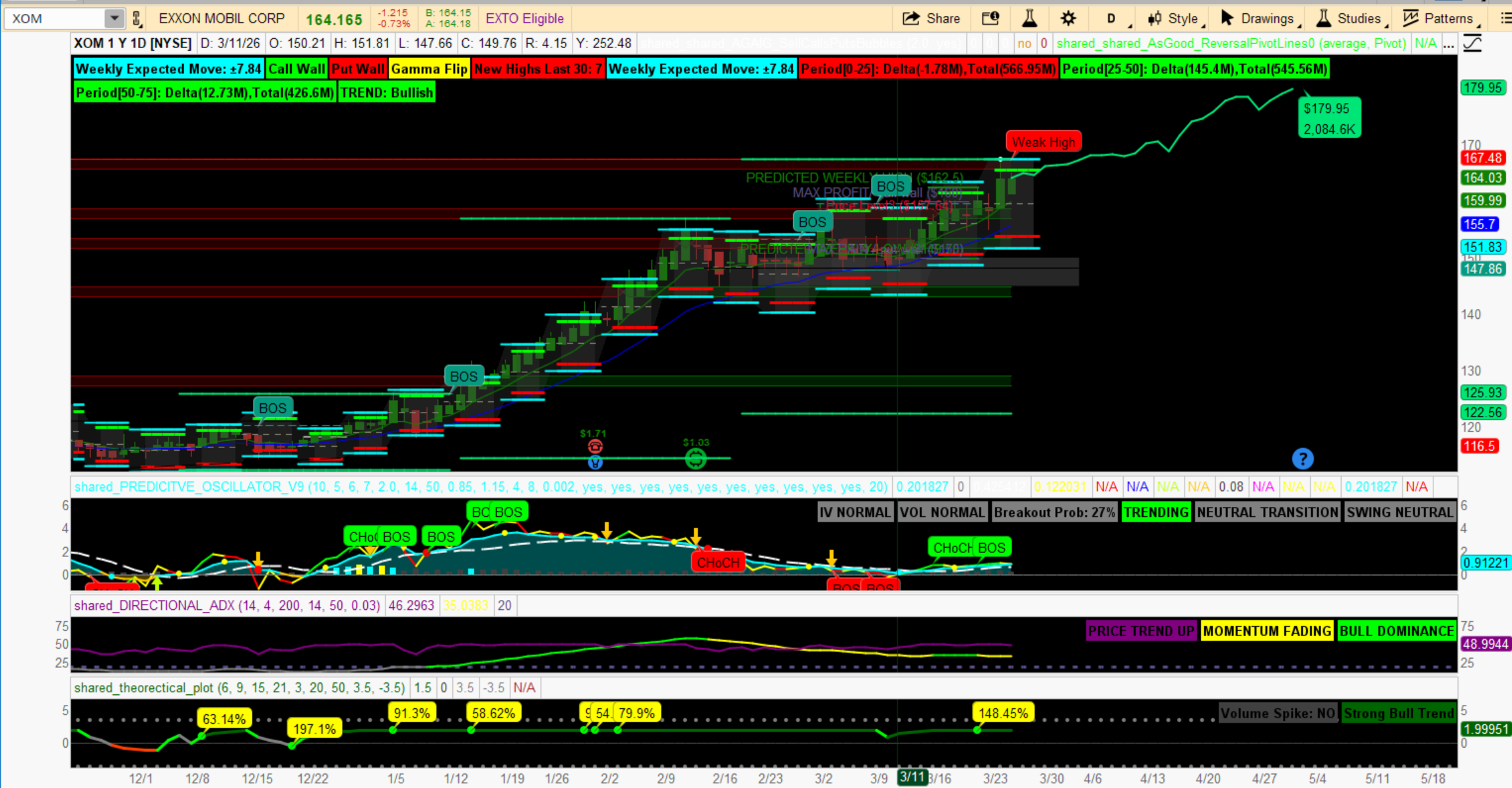
Here is something that in a way replaces having to draw your GEX data manually.
the quick description is:
# DEALER RANGES
# SETTING UP PREDICTED MOVES FOR THE WEEK
# CALL WALLS AND PUT WALLS
# WEEKLY GAMMA FLIPS FROM POSITIVE AND NEGATIVE GAMMA
# THESE PREDICTED MOVES ACT AS A FORM OF SUPPORT AND RESISTANCE
# CALL AND PUTWall WALLS ACT AS MAGNETS AND SUPPLY AND DEMANDIndex ZONES
# WEEKLY GAMMA LINE IDENTIFIES CHANGES IN DEALERS HEDGING STRATEGIES
# ANTWERKS 03/14/2026
You will find that OI sets up in these same ranges as well as most supply and demand scripts.
Code:
# DEALER RANGES
# SETTING UP PREDICTED MOVES FOR THE WEEK
# CALL WALLS AND PUT WALLS
# WEEKLY GAMMA FLIPS FROM POSITIVE AND NEGATIVE GAMMA
# THESE PREDICTED MOVES ACT AS A FORM OF SUPPORT AND RESISTANCE
# CALL AND PUTWall WALLS ACT AS MAGNETS AND SUPPLY AND DEMANDIndex ZONES
# WEEKLY GAMMA LINE IDENTIFIES CHANGES IN DEALERS HEDGING STRATEGIES
# ANTWERKS 03/14/2026
declare upper;
input showLabels = yes;
# Detect new week
def newWeek = GetWeek() <> GetWeek()[1];
# Capture Friday close
def fridayClose =
if newWeek then close[1]
else fridayClose[1];
# Capture IV once per week
def weeklyIV =
if newWeek then imp_volatility()
else weeklyIV[1];
# Weekly expected move
def EM =
fridayClose * weeklyIV * Sqrt(7 / 365);
# Lock EM
def lockedEM =
if newWeek then EM
else lockedEM[1];
# Expected move levels
def EMhigh = fridayClose + lockedEM;
def EMlow = fridayClose - lockedEM;
# Dealer levels (approx)
def callWall = fridayClose + (lockedEM * 0.75);
def putWall = fridayClose - (lockedEM * 0.75);
# Gamma flip (pivot)
def gammaFlip = fridayClose;
# Break connection at start of week
def breakLine = if newWeek then Double.NaN else 1;
# Plots
plot ExpectedHigh = if breakLine then EMhigh else Double.NaN;
plot ExpectedLow = if breakLine then EMlow else Double.NaN;
plot CallWall1 = if breakLine then callWall else Double.NaN;
plot PutWall1 = if breakLine then putWall else Double.NaN;
plot GammaFlip1 = if breakLine then gammaFlip else Double.NaN;
ExpectedHigh.SetPaintingStrategy(PaintingStrategy.HORIZONTAL);
ExpectedHigh.SetDefaultColor(Color.CYAN);
ExpectedHigh.SetLineWeight(2);
ExpectedLow.SetPaintingStrategy(PaintingStrategy.HORIZONTAL);
ExpectedLow.SetDefaultColor(Color.CYAN);
ExpectedLow.SetLineWeight(2);
CallWall1.SetPaintingStrategy(PaintingStrategy.HORIZONTAL);
CallWall1.SetDefaultColor(Color.green);
CallWall1.SetLineWeight(3);
PutWall1.SetPaintingStrategy(PaintingStrategy.HORIZONTAL);
PutWall1.SetDefaultColor(Color.red);
PutWall1.SetLineWeight(3);
GammaFlip1.SetPaintingStrategy(PaintingStrategy.HORIZONTAL);
GammaFlip1.SetDefaultColor(Color.YELLOW);
GammaFlip1.SetStyle(Curve.SHORT_DASH);
# Optional EM range shading
AddCloud(ExpectedHigh, ExpectedLow, Color.DARK_GRAY, Color.DARK_GRAY);
# Labels
AddLabel(showLabels, "Weekly Expected Move: ±" + Round(lockedEM,2), Color.CYAN);
AddLabel(showLabels, "Call Wall", Color.MAGENTA);
AddLabel(showLabels, "Put Wall", Color.GREEN);
AddLabel(showLabels, "Gamma Flip", Color.YELLOW);
useThinkScript is the #1 community of stock market investors using indicators and other tools to power their trading strategies. Traders of all skill levels use our forums to learn about scripting and indicators, help each other, and discover new ways to gain an edge in the markets.
How do I get started?
We get it. Our forum can be intimidating, if not overwhelming. With thousands of topics, tens of thousands of posts, our community has created an incredibly deep knowledge base for stock traders. No one can ever exhaust every resource provided on our site.
If you are new, or just looking for guidance, here are some helpful links to get you started.
VIP members get exclusive access to these proven and tested premium indicators: Buy the Dip, Advanced Market Moves 2.0, Take Profit, and Volatility Trading Range. In addition, VIP members get access to over 50 VIP-only custom indicators, add-ons, and strategies, private VIP-only forums, private Discord channel to discuss trades and strategies in real-time, customer support, trade alerts, and much more. Learn all about VIP membership here.
How can I access the premium indicators?
To access the premium indicators, which are plug and play ready, sign up for VIP membership here.