

anand_bitra
New member
mod note:
A volatility‑based trend oscillator that tracks the battle between a bullish component and a bearish component using recursive exponential envelopes. Crossovers define entries; signal‑line breaks define exits.
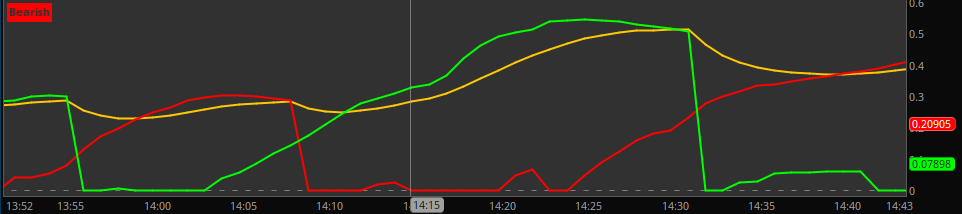
A volatility‑based trend oscillator that tracks the battle between a bullish component and a bearish component using recursive exponential envelopes. Crossovers define entries; signal‑line breaks define exits.
▸ Long Entry: bullish component crosses above bearish
▸ Short Entry: bearish component crosses above bullish
▸ Exit Long: bullish component crosses below signal line
▸ Exit Short: bearish component crosses below signal line
Code:
# Dynamic Price Oscillator
# Author: Anand Bitra
# Date: 2026-05-26
# Description :
# Long : bullish component cross over bearish component
# Short : bearish component cross over bullish component
# Exit Long : bullish component cross under signal line
# Exit Short : bearish component cross under signal line
# Credits: Alex Pierrefeu - https://alpaca.markets/learn/andean-oscillator-a-new-technical-indicator-based-on-an-online-algorithm-for-trend-analysis

declare lower;
declare once_per_bar;

input length = 50;
input sigLength = 9;

def alpha = 2.0 / (length + 1);

def C = close;
def O = open;

# Recursive exponential envelopes
rec up1 =
if IsNaN(up1[1]) then C
else Max(Max(C, O), up1[1] - (up1[1] - C) * alpha);

rec up2 =
if IsNaN(up2[1]) then C * C
else Max(Max(C * C, O * O),
up2[1] - (up2[1] - C * C) * alpha);

rec dn1 =
if IsNaN(dn1[1]) then C
else Min(Min(C, O),
dn1[1] + (C - dn1[1]) * alpha);

rec dn2 =
if IsNaN(dn2[1]) then C * C
else Min(Min(C * C, O * O),
dn2[1] + (C * C - dn2[1]) * alpha);

# Components
def bullRaw = dn2 - dn1 * dn1;
def bearRaw = up2 - up1 * up1;

def bull = if bullRaw > 0 then Sqrt(bullRaw) else 0;
def bear = if bearRaw > 0 then Sqrt(bearRaw) else 0;

# Signal
def dominant = Max(bull, bear);
def signal = ExpAverage(dominant, sigLength);

# Plots
plot BullishComponent = bull;
BullishComponent.SetDefaultColor(Color.GREEN);
BullishComponent.SetLineWeight(2);

plot BearishComponent = bear;
BearishComponent.SetDefaultColor(Color.RED);
BearishComponent.SetLineWeight(2);

plot SignalLine = signal;
SignalLine.SetDefaultColor(Color.ORANGE);
SignalLine.SetLineWeight(2);

# Optional zero line
plot ZeroLine = 0;
ZeroLine.SetDefaultColor(Color.GRAY);
ZeroLine.SetStyle(Curve.SHORT_DASH);

AddLabel(yes, if bull > bear then "Bullish" else "Bearish", if bull > bear then Color.GREEN else Color.RED);
Last edited by a moderator:


