B2_Bmbr9(52) Strategy For ThinkOrSwim

Adeodatus

Active member
Plus
Systematical code from another watery Strategy, but the detail is good, though strangled sometimes by blocks of inst. short-sell trades. Dynamic updates too.

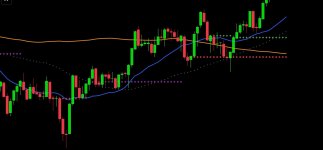
The lines:

Orange 200 MA
Blue 20 MA

Shallow Grey dash is the 50/50 trade line, the buy /sell differential.
Once the PPS has moved above the Blue and they cross the Orange, a trade may be put on. DYODD!

Red line is the enter short, Green enter long, Purple Exit line (Horizontal)
You'll get chimes, messages for them that flash on the chart, then are loaded to messages.

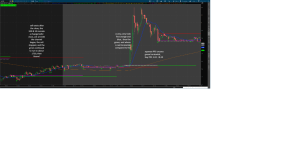
See chart, right after open:

ACHR is still in down trend, the Red line at open is the sell from premarket (continues),
establishes a straight grey line (trailing stop), and plots another Green(long entry) and Purple (Exit trade)
the changes are due to market changes as it runs through the day, of course.

2025-11-17-TOS_CHARTS.png
 
Another example of the Red line continues through open, the Green is staying at buy and as PPS moves close to green the Purple moves to nearly cross the buy line.
2025-11-17-TOS_CHARTSa.png
 
are you going to post the code?
what is pps?

why do green and red lines start not on a candle? that isn't realistic if you can't buy at the line price.
 
Hello Hal, implement centroid re-calculation Hello Hal,

Yes the code is real, i'm just not just yet, a portion, such as the code to plot the different line at times i can leave next time, okay?

PPS is the points per share, the share price as its running through the day good man.

For a certain reason the strategy will flash a buy or sell signal and then fade it from the chart, but its posted on messages.

OK. about not at starting at a candle, the strategy is to enter a call or a put option, or as in the straight out stock purchase, it does that in a way, except change is a dynamic type analysis and strategy to give a picture, not a buy/sell trade command. The further away the lines are rightly, its your DD.

2025-11-18-TOS_CHARTSb.png
 
Hal, you see the building up, and notice the little red dot(?), another indicator from the F18 static.
2025-11-18-TOS_CHARTSc.png
 
So stay up with the changes as the market keeps "caah-ch-geen-ing", its important to get the recognition benefit startled. Kept coding to allow for permanent untra-bubble to remain active to reversal data impedes trend.
2025-11-18-TOS_CHARTSE.png
 
and before the closing bell, the Time frame is receding View attachment 26260
Sorry, I’m still a little confused… Is your indicator the one on the main chart, or one of the lower indicators shown in the pictures? (I'm assuming it's the indicator on the main chart) Also, could you explain what signals you’re looking for to buy or sell?
 
Last edited:
Sorry, I’m still a little confused… Is your indicator the one on the main chart, or one of the lower indicators shown in the pictures? (I'm assuming it's the indicator on the main chart) Also, could you explain what signals you’re looking for to buy or sell?
I think this is the indicator ,is actually a strategy that plots the levels and uses 20,50,200 SMAs ,I am Pretty sure that's it, there's other indicators there but unless the user decides to share those is just an explanation of how they work. Photo attached .
 

Attachments

  • Screenshot_20251119_021049_Chrome.jpg
    Screenshot_20251119_021049_Chrome.jpg
    31.9 KB · Views: 63
Something like this.more or less. I recreated this on pine..
 

Attachments

  • Screenshot_20251119_021648_TradingView.jpg
    Screenshot_20251119_021648_TradingView.jpg
    97.3 KB · Views: 91
I think this is the indicator ,is actually a strategy that plots the levels and uses 20,50,200 SMAs ,I am Pretty sure that's it, there's other indicators there but unless the user decides to share those is just an explanation of how they work. Photo attached .
Correct, the code is an assembly configured to utilize the best of data Thinkorswim provides we retail trader's active levels for day trading, swing trading and investing, but i only include the 20 and 200 MA.
 
Something like this.more or less. I recreated this on pine..
Like that, but not the same. It's a work of coding stingier with time and easy to change by open coders. Realistically its fairly simple coding, but the combinations are what exacts the plotting. I like to see rotation taking place and its changes are only on charts with lower times, and the blessing on the bottom is what the code bounces Logic. Its out searching for markers, the un-visited ratios and Greeks as they pull and push the PPS.

Lets look at the chart, any Ticker suggestion, post it
 
and before the closing bell, the Time frame is receding View attachment 26260
I was tired, but recall not including any text. What are those steps. Orange, blue, red, green, and purple, etc. I went to higher time, ticker is squeezing, would imply a move up, the red is the sell line so it still says "sell below Red", but green has widened away so it's less volatility, less chance of a big move. Hovering is not moving.
 
Morning scan, last ten minutes, large inst. sells drops, continues after close, went to purple purple (close trade) signal and bounces at buyer's grey. Its never clear until the data lands, and this only goes to midnight, and the input from F18_02 is denied access because Options market is resetting before open: however, seem like live trade data (Pre-Market) is landing

2025-11-19-TOS_CHARTSA.png
 
That was a good guess. Hardly seen that coming. This is data played out, dont ask why I'm on ACHR doing this imaging.
2025-11-19-TOS_CHARTSC.png
 

Join useThinkScript to post your question to a community of 21,000+ developers and traders.

Similar threads

Not the exact question you're looking for?

Start a new thread and receive assistance from our community.

87k+ Posts
742 Online
Create Post

Similar threads

Similar threads

The Market Trading Game Changer

Join 2,500+ subscribers inside the useThinkScript VIP Membership Club
  • Exclusive indicators
  • Proven strategies & setups
  • Private Discord community
  • ‘Buy The Dip’ signal alerts
  • Exclusive members-only content
  • Add-ons and resources
  • 1 full year of unlimited support

Frequently Asked Questions

What is useThinkScript?

useThinkScript is the #1 community of stock market investors using indicators and other tools to power their trading strategies. Traders of all skill levels use our forums to learn about scripting and indicators, help each other, and discover new ways to gain an edge in the markets.

How do I get started?

We get it. Our forum can be intimidating, if not overwhelming. With thousands of topics, tens of thousands of posts, our community has created an incredibly deep knowledge base for stock traders. No one can ever exhaust every resource provided on our site.

If you are new, or just looking for guidance, here are some helpful links to get you started.

What are the benefits of VIP Membership?
VIP members get exclusive access to these proven and tested premium indicators: Buy the Dip, Advanced Market Moves 2.0, Take Profit, and Volatility Trading Range. In addition, VIP members get access to over 50 VIP-only custom indicators, add-ons, and strategies, private VIP-only forums, private Discord channel to discuss trades and strategies in real-time, customer support, trade alerts, and much more. Learn all about VIP membership here.
How can I access the premium indicators?
To access the premium indicators, which are plug and play ready, sign up for VIP membership here.
Back
Top